Self-Hosted Drip Email Campaigns: The Ultimate Guide
Section I: The Strategic Decision: Control, Cost, and Data Sovereignty
The decision to self-host an email marketing platform is a foundational business strategy, not merely a technical preference. It represents a deliberate shift from a model of renting infrastructure to one of owning and controlling a core marketing asset. This section provides a strategic framework for this decision, analyzing the operational, financial, and philosophical trade-offs between the self-hosted paradigm and the prevalent Software-as-a-Service (SaaS) model. It moves beyond a surface-level comparison to explore the long-term implications for data sovereignty, cost structure, and business autonomy.
Chapter 1: The Self-Hosting Paradigm vs. The SaaS Model: A Strategic Framework
Choosing an email marketing infrastructure is analogous to deciding between cooking a meal in a custom-built kitchen versus dining at a restaurant. Both can yield excellent results, but they are fundamentally different experiences driven by distinct priorities regarding control, convenience, cost, and responsibility. Understanding this distinction is the first step toward making an informed strategic choice.
The Self-Hosted Proposition
Self-hosting involves installing, managing, and maintaining email marketing software on a server that the business controls. This approach is defined by three core strategic advantages: absolute control, unalienable data sovereignty, and long-term cost-efficiency at scale.
- Absolute Control & Customization: In a self-hosted environment, the business owns both the software and the server on which it runs. This grants an unparalleled level of control. It enables limitless customization, from branding the user interface for agency clients to modifying the core source code of open-source platforms to meet specific business requirements. Integrations are not limited to a vendor’s pre-approved list; a developer-friendly platform can be connected to any proprietary CRM, database, or internal workflow via its API. This level of control is particularly valuable for organizations with unique operational needs or those that require deep integration with their existing technology stack.
- Unalienable Data Sovereignty: With self-hosted software, all subscriber data, campaign analytics, and user information reside on the business’s own infrastructure. This is a critical advantage for industries handling sensitive information, such as healthcare, finance, or legal services, where data privacy and compliance are paramount. It eliminates the risks associated with storing data on third-party servers, which can include vendor data breaches, unexpected policy changes, or account suspension for perceived violations of terms of service. By maintaining full ownership of the data, a business ensures it can manage backups, implement custom security protocols, and control data residency to comply with jurisdictional regulations. This choice is not merely technical; it is a strategic commitment to data sovereignty. This commitment, however, directly creates the legal burden of becoming the primary data controller, with full responsibility for compliance under regulations like GDPR. SaaS platforms typically act as data processors, sharing this burden, whereas a self-hoster assumes it entirely. The decision to “own the data” is therefore an implicit decision to accept the full legal and operational responsibilities of a Data Controller, including managing consent records, handling data erasure requests, and ensuring robust data security—tasks often abstracted away by SaaS vendors.
- Cost-Efficiency at Scale: The financial model of self-hosting is characterized by a higher initial investment followed by significantly lower and more predictable recurring costs. The upfront costs may include a one-time software license or the time investment for setting up an open-source solution. However, the ongoing costs are typically limited to server hosting fees and the per-email sending costs of an SMTP relay service. This model becomes exceptionally cost-effective for businesses with large subscriber lists or high sending volumes. While SaaS platforms scale their pricing based on the number of contacts, often charging thousands per month for large lists, the cost of sending via a service like Amazon SES remains remarkably low—often mere cents for thousands of emails. This allows a business to grow its list without incurring exponentially higher monthly fees.
The SaaS Proposition
Cloud-based or SaaS email marketing platforms offer a compelling alternative centered on convenience, managed services, and speed to market. These services handle the underlying technical complexities, allowing businesses to focus on marketing rather than infrastructure management.
- Simplicity and Speed: SaaS platforms are designed to be plug-and-play. The setup process is minimal, often requiring little to no technical expertise. Users do not have to worry about server provisioning, software installation, security updates, or system maintenance; the vendor handles all of these responsibilities. This allows marketing teams to get campaigns off the ground in minutes rather than days, focusing their efforts on content creation and strategic planning.
- Managed Deliverability: One of the most significant advantages of SaaS platforms is that they manage the complex and challenging task of email deliverability. These providers invest heavily in maintaining high reputations for their sending IP addresses, managing relationships with Internet Service Providers (ISPs), and navigating the intricacies of spam filters and blacklists. For a self-hoster, achieving and maintaining high deliverability is a major, ongoing responsibility; for a SaaS user, it is a core feature of the service.
- Integrated Feature Sets: Cloud-based platforms typically offer a polished and user-friendly experience, with extensive libraries of professionally designed, mobile-friendly templates, intuitive drag-and-drop automation builders, and comprehensive analytics dashboards available out of the box. While self-hosted solutions offer customization, SaaS platforms provide a high degree of immediate functionality without the need for configuration or development.
Decision Matrix
The choice between self-hosting and SaaS is not about which is “better” but which is the right fit for a specific organization’s resources, priorities, and goals. A decision matrix can help clarify this choice by weighing key factors:
- Technical Expertise: If the organization has in-house IT expertise or is willing to invest in it, self-hosting is viable. For non-technical users, a SaaS solution is the safer and more sustainable option.
- Budget (Upfront vs. Ongoing): Self-hosting requires a higher upfront investment in software and setup time but offers lower long-term costs. SaaS spreads costs through predictable recurring subscription fees, which can be more manageable for startups but more expensive at scale.
- Data Sensitivity and Compliance: For businesses in regulated industries or those with strict data privacy requirements, the complete data ownership offered by self-hosting provides superior control and facilitates compliance.
- Business Size and Scalability: Small businesses may benefit from the simplicity of SaaS. Larger organizations with complex needs, high sending volumes, or the need for deep customization may find the control and cost-efficiency of self-hosting more advantageous.
- Need for Control: If the business requires full control over its data, software configurations, and integration capabilities, self-hosting is the only option that provides this level of autonomy.
Ultimately, the decision hinges on a strategic assessment of whether the organization prioritizes convenience and managed services or control and long-term cost-efficiency.
Chapter 2: A Financial Deep Dive: Total Cost of Ownership (TCO)
A superficial cost analysis often favors SaaS solutions due to their low initial barrier to entry. However, a comprehensive evaluation of the Total Cost of Ownership (TCO) over a multi-year period frequently reveals a different financial picture, particularly for businesses anticipating growth. A realistic financial model must account for all direct, indirect, and implicit costs associated with each approach.
Deconstructing Self-Hosting Costs
The TCO of a self-hosted solution is a composite of several distinct cost categories that must be carefully considered.
- Upfront Costs: This is the initial capital outlay required to get the system operational. For commercial self-hosted software like MailWizz or Acelle Mail, this involves a one-time license fee. For open-source solutions such as Mautic or Listmonk, the software itself is free, but the “cost” is the significant time and technical expertise required for a successful installation and configuration.
- Recurring Infrastructure Costs: These are the predictable monthly expenses for the underlying hardware and network. The primary cost is the Virtual Private Server (VPS) hosting fee, which can range from a modest amount for a small list to a more substantial figure for a high-performance server capable of managing millions of contacts. Other minor costs include annual domain name registration.
- Recurring Sending Costs: This is the variable cost that scales with usage and is the cornerstone of the self-hosted financial model.
By using a third-party SMTP relay service like Amazon Simple Email Service (SES), Mailgun, or SendGrid, the cost shifts from a per-subscriber model to a per-send model. The cost of sending via Amazon SES, for example, is exceptionally low, often around $0.10 per 1,000 emails. This contrasts sharply with SaaS providers, whose fees escalate rapidly with list size. For instance, a list of 50,000 subscribers sending 100,000 emails per month can result in significantly lower long-term costs with a self-hosted solution compared to even the most limited tiers of SaaS providers.
- Hidden & Implicit Costs: This category represents the “sweat equity” and is the most frequently underestimated component of TCO. It includes the monetary value of the time spent by technical staff on:
- Initial Setup and Configuration: A non-trivial process that can take many hours or even days.
- Ongoing Maintenance: Applying software updates, security patches, and managing server performance.
- Troubleshooting: Diagnosing and resolving issues, from software bugs to server crashes.
- Deliverability Management: Proactively monitoring IP reputation, checking blacklists, and addressing any issues that cause emails to land in spam folders. This is a continuous and often time-consuming task.
TCO Calculation Framework
To make an informed financial decision, an organization should project its TCO over a period of at least three years. The following framework provides a sample worksheet for this calculation.
Sample 3-Year TCO Projection Worksheet
| Cost Category | Self-Hosted Model | SaaS Model (Comparable Tier) |
|---|---|---|
| Year 1: Upfront Costs | ||
| Software License (One-Time) | e.g., $495 (MailWizz) | $0 |
| Initial Setup (Labor Hours x Rate) | e.g., 20 hrs x $75/hr = $1,500 | e.g., 2 hrs x $75/hr = $150 |
| Year 1: Recurring Costs | ||
| VPS Hosting (Monthly x 12) | e.g., $40/mo x 12 = $480 | Included in subscription |
| SMTP Relay (Emails/mo x 12 x Rate) | e.g., 100k/mo x 12 x $0.10/1k = $120 | Included in subscription |
| SaaS Subscription (Monthly x 12) | $0 | e.g., $250/mo x 12 = $3,000 |
| Maintenance (Labor Hours/mo x 12 x Rate) | e.g., 5 hrs/mo x 12 x $75/hr = $4,500 | Included in subscription |
| Year 1 Total Cost | $7,095 | $3,150 |
| Year 2 & 3: Recurring Costs (per year) | ||
| VPS Hosting | $480 | Included |
| SMTP Relay (Assuming growth to 200k/mo) | e.g., 200k/mo x 12 x $0.10/1k = $240 | Included |
| SaaS Subscription (Assuming growth pushes to higher tier) | $0 | e.g., $400/mo x 12 = $4,800 |
| Maintenance (Labor) | $4,500 | Included |
| Year 2 & 3 Total Cost (per year) | $5,220 | $4,800 |
| 3-Year Total Cost of Ownership | ||
| $17,535 | $12,750 | |
Note: This is a simplified example. A real-world calculation must adjust for actual list size, sending volume, labor costs, and specific SaaS pricing tiers. The example demonstrates that while SaaS is cheaper in Year 1, the costs can converge or be surpassed by self-hosting costs depending on the value assigned to labor. The true advantage of self-hosting emerges at much larger scales where SaaS costs can reach tens of thousands of dollars annually.
This detailed financial analysis forces a more nuanced conversation. The decision is not simply about monthly fees but about the strategic allocation of resources—capital versus labor—and the long-term financial trajectory of the marketing operation.
Chapter 3: The Hybrid Approach: The Best of Both Worlds
The modern, effective approach to self-hosted email marketing is not a monolithic, entirely self-contained system. Instead, the most successful and scalable architecture is a hybrid model that intelligently combines the control of a self-hosted application with the specialized power of a third-party email delivery service. This model has become the de facto standard because it directly addresses the single greatest challenge of self-hosting: email deliverability.
Defining the Hybrid Model
The hybrid architecture involves two distinct components working in concert:
- The Self-Hosted Application: This is the “brain” of the operation. A platform like Mautic, MailWizz, or Listmonk is installed on a server the business controls. This application is used to manage subscriber lists, build segmentation rules, design email templates, and create complex automation workflows. It is where all marketing logic and subscriber data are housed.
- The Third-Party SMTP Relay Service: This is the “mouthpiece” of the operation. Instead of configuring the local server to send emails directly to recipients—a process fraught with deliverability pitfalls—the self-hosted application is configured to hand off every outgoing email to a specialized mail relay service, such as Amazon SES, Mailgun, or SendGrid. This service then handles the final, complex step of delivering the email to the recipient’s inbox.
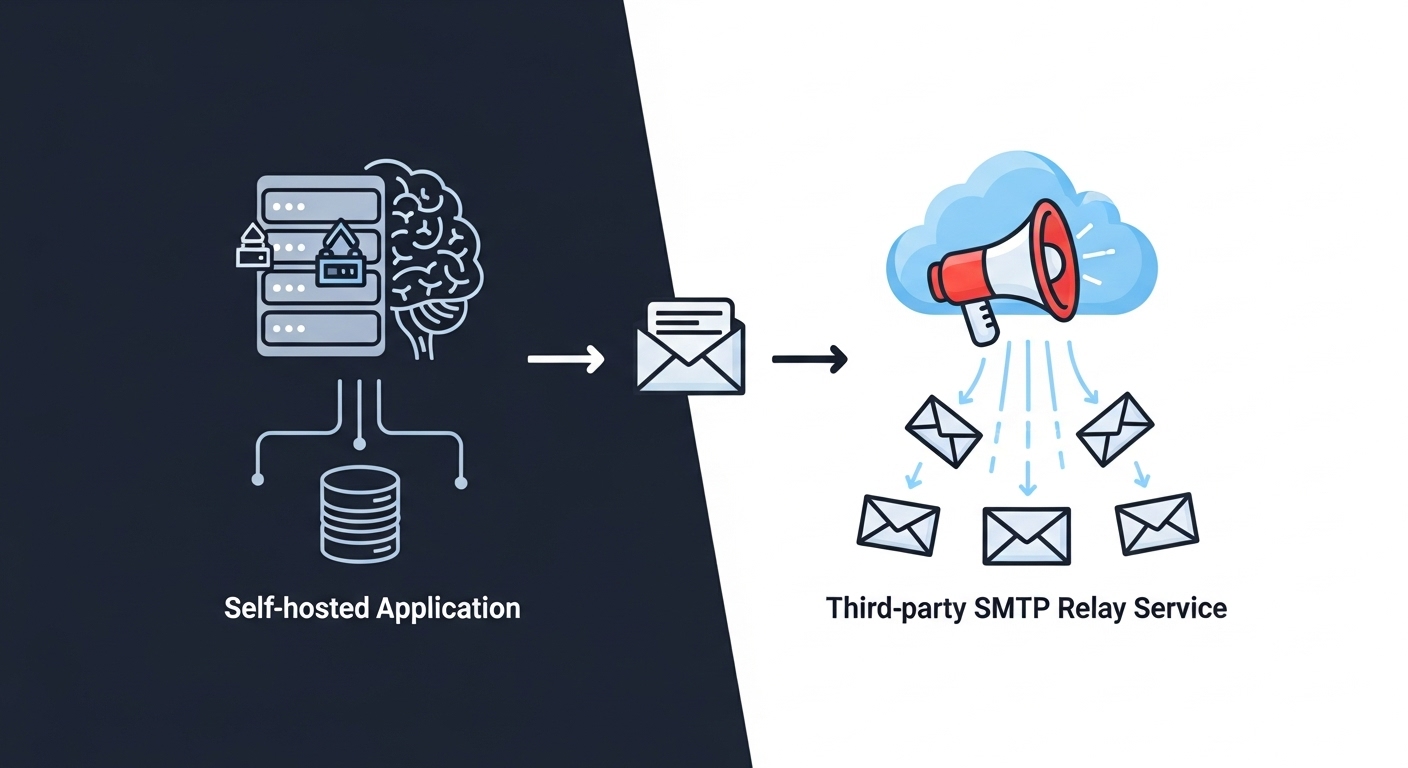
This architecture represents a fundamental unbundling of the traditional email marketing stack. It separates the Marketing Automation Platform (MAP), which the business owns and controls, from the Email Delivery Service (EDS), which is consumed as a utility. This separation is analogous to the broader trend in enterprise software toward composable, API-first architectures, where businesses select best-in-class components for each function rather than relying on a single, monolithic solution. This unbundling allows for greater flexibility, specialization, and cost-efficiency than integrated SaaS platforms can typically offer.
Why This Model Dominates
The hybrid model is not merely an alternative; it is the most strategically sound approach for any serious self-hosted email marketing endeavor. Its dominance is due to several key advantages that mitigate the primary risks of self-hosting.
- Separation of Concerns: This architecture allows each component to do what it does best. The self-hosted application excels at managing marketing strategy, data, and automation logic. The SMTP relay service excels at the highly specialized, infrastructure-intensive task of high-volume email delivery. The business retains full control over its marketing assets while outsourcing the commoditized—but technically challenging—delivery function.
- Mitigating the Deliverability Challenge: The single greatest point of failure for purely self-hosted email systems is building and maintaining a positive sender reputation for the server’s IP address. New IPs are inherently untrusted by major ISPs, and the process of “warming up” an IP by gradually increasing sending volume can take weeks or months and is easily derailed. SMTP relay services have already done this hard work. They manage vast pools of pre-warmed, highly reputable IP addresses and have dedicated teams that maintain relationships with ISPs, handle feedback loops, and monitor blacklists. By using a relay, a self-hoster effectively bypasses this entire nightmare, leveraging the established reputation of the provider to ensure high deliverability from day one.
- Unlocking Scalability and Cost-Effectiveness: The hybrid model provides the best of both worlds financially. The business avoids the high, per-subscriber costs of SaaS platforms while also avoiding the immense capital and operational expense of building a globally redundant, highly reputable email delivery infrastructure from scratch. API-driven SMTP services offer enterprise-grade deliverability as a pay-as-you-go utility, making it possible to send millions of emails at a fraction of the cost of an all-in-one SaaS solution. This combination of a one-time software cost (or free open-source software) with low, variable sending costs makes the hybrid model the most economically scalable solution for high-volume senders.
In essence, the hybrid model allows a business to achieve the primary goals of self-hosting—control, data ownership, and customization—without taking on the insurmountable burden of becoming a professional email service provider. It is the pragmatic and powerful architecture that makes self-hosted drip email campaigns a viable and successful strategy for the modern enterprise.
Section II: Architecting the Technical Foundation
Once the strategic decision to self-host has been made, the focus shifts to the practical construction of the marketing infrastructure. This section provides a detailed, hands-on guide to selecting the core components—the server and the software—and bringing the system online. It translates the strategic framework from Section I into a series of concrete, technical actions designed to build a robust and scalable foundation for all future campaigns.
Chapter 4: Selecting Your Virtual Private Server (VPS): The Digital Headquarters
The choice of a Virtual Private Server (VPS) is the most critical infrastructure decision in a self-hosted email marketing setup. A VPS provides an isolated environment with dedicated resources, a crucial step up from shared hosting, but not all VPS providers are suitable for the unique demands of sending email. Selecting the right provider and plan requires a focus on specific technical criteria that directly impact deliverability and performance.
Critical Selection Criteria
When evaluating VPS providers for email marketing, the following factors are non-negotiable and should be prioritized over raw price or performance metrics.
- Port 25 Availability: This is the single most important technical requirement. Port 25 is the standard port for SMTP (Simple Mail Transfer Protocol), the protocol used for sending email between servers. To combat spam, many hosting providers block outbound traffic on port 25 by default. A business must select a provider that either leaves port 25 open or has a clear, documented process for requesting it to be unblocked.
Without an open port 25, the server cannot communicate with other mail servers, rendering it useless for sending email directly (though it can still use a relay service on other ports like 587).
- Dedicated IP Address: A VPS must come with a dedicated, static IP address. On shared hosting, an IP address is used by hundreds of other websites, and the actions of one “neighbor”—such as sending spam—can damage the reputation of the entire shared IP, negatively impacting the deliverability of all other users. A dedicated IP ensures that the sender’s reputation is built and maintained based solely on their own sending practices.
- Reverse DNS (rDNS/PTR Record) Configuration: This is a fundamental and often overlooked requirement for email deliverability. While a standard DNS ‘A’ record maps a domain name to an IP address, a reverse DNS ‘PTR’ record does the opposite, mapping the IP address back to a domain name. Major ISPs like Gmail and Microsoft perform rDNS lookups as a primary anti-spam check. If the sending IP address does not have a valid PTR record that resolves back to the sending domain, the email is highly likely to be rejected or routed to the spam folder. The VPS provider’s control panel must allow the user to easily set or request a PTR record for their dedicated IP.
- Performance & Scalability: The VPS must be provisioned with sufficient resources—CPU, RAM, and storage—to run the chosen email marketing software without performance degradation. Modern applications often require a minimum of 2 vCPUs and 4GB of RAM to function effectively. Furthermore, the provider should offer a seamless path to scale these resources up as the subscriber list and sending volume grow, preventing the need for a complicated server migration in the future. Fast storage, such as SSD or NVMe drives, is also crucial for database performance, which underpins the entire application.
- Provider Reputation and Clean IP Ranges: The reputation of the hosting provider itself matters. Some budget providers have become havens for spammers, and as a result, their entire IP address ranges may be preemptively distrusted or blacklisted by major ISPs. It is essential to choose a reputable provider known for maintaining clean IP networks. Before committing, it is wise to check the reputation of a sample IP address from the provider using tools like MXToolbox to see if it appears on any major blacklists.
Recommended Providers & Tiers
Based on these criteria, several providers are frequently recommended for self-hosted email marketing, offering a good balance of features, performance, and email-friendly policies.
- DigitalOcean / Vultr (via Cloudways): For those who want the power of a VPS without the headache of server management, managed platforms like Cloudways are an excellent choice. They provision servers from top-tier infrastructure providers like DigitalOcean or Vultr, but handle the server setup, security patching, and maintenance, allowing the user to focus on installing the application.
- Hetzner: A popular choice in the self-hosting community, known for providing powerful dedicated and cloud servers at competitive prices. While they often block port 25 by default, they have a clear process for requesting it to be unblocked for legitimate use cases, making them a viable option.
- Contabo: Known for offering VPS plans with generous RAM and storage allocations at a very affordable price point. This makes them a strong candidate for businesses that need to host very large subscriber lists and databases on a budget.
- Liquid Web: A premium option that specializes in managed VPS hosting. While more expensive, they provide a high level of support and management, making them suitable for businesses that want to self-host their application but outsource the underlying server administration.
The final choice will depend on the business’s budget, technical comfort level, and anticipated scale, but any selection must begin by verifying the non-negotiable criteria of port 25 availability and rDNS configuration.
Chapter 5: The Self-Hosted Software Landscape: A Comparative Analysis
With the server infrastructure selected, the next critical decision is choosing the software application that will serve as the central nervous system of the email marketing operation. The self-hosted landscape offers a diverse range of powerful platforms, each with its own technological foundation, feature set, and ideal use case. This chapter provides a detailed comparative analysis of the leading contenders to help organizations select the right “brain” for their specific needs.
In-Depth Platform Reviews
- Mautic: Mautic is the undisputed powerhouse of open-source marketing automation. Built on the PHP Symfony framework, it extends far beyond email to encompass multi-channel campaign management, including SMS, web notifications, and social media integrations. Its core strengths lie in sophisticated lead management, with features like lead scoring, dynamic content personalization, and a visual campaign builder that can create complex, multi-step workflows. Mautic is best suited for businesses that require a full-funnel marketing automation platform with deep CRM integration capabilities (e.g., Salesforce, HubSpot, Zoho CRM). Its comprehensive feature set, however, comes with a higher demand for server resources and a steeper learning curve compared to more email-focused tools.
- Acelle Mail: Acelle Mail is a commercial, self-hosted platform written in PHP on the Laravel framework. Its standout feature is that it is designed from the ground up as a Software-as-a-Service (SaaS) framework. This makes it an ideal choice for marketing agencies or entrepreneurs who want to run their own email marketing service, complete with user management, subscription plans, and payment gateway integrations (PayPal, Stripe, etc.). For individual businesses, it offers a robust suite of features, including a powerful visual automation builder, list segmentation, A/B testing, and detailed performance tracking. Its commercial nature means it comes with a one-time license fee but also the benefit of professional support.
- Listmonk: Listmonk represents a modern, minimalist, and high-performance approach to self-hosted email. Written in the Go programming language and backed by a PostgreSQL database, it is delivered as a single binary application with a remarkably low CPU and memory footprint. Its primary focus is on efficiently managing massive subscriber lists and sending high volumes of newsletters and transactional emails. While it supports automation via API and webhooks, it lacks the complex visual workflow builders found in Mautic or Acelle. Its strengths are raw performance, scalability, and a developer-centric, API-first design. It is the ideal choice for tech-savvy users who prioritize speed and resource efficiency for large-scale sending operations.
- Mailtrain: Mailtrain is a popular open-source newsletter application built on Node.js and using MySQL or MariaDB for its database. It offers a solid set of features for list management, segmentation (including rules-based segmentation), and automation (for triggered and RSS-based campaigns). It includes modern features like support for MJML-based responsive email templates and allows for granular user permissions, making it suitable for team-based workflows. Mailtrain strikes a balance between the comprehensive automation of Mautic and the high-performance focus of Listmonk, making it a versatile general-purpose tool for managing newsletters and automated campaigns.
- Other Notables: The landscape also includes other strong contenders. SendPortal is an open-source platform built on Laravel, known for its beautiful interface and API-first approach, making it highly extensible for developers. phpList, one of the oldest and most established open-source solutions, continues to be a reliable choice with strong community support, focused on straightforward newsletter and campaign management.
Comparative Analysis of Self-Hosted Email Marketing Platforms
| Feature | Mautic | Acelle Mail | Listmonk | Mailtrain |
|---|---|---|---|---|
| Core Technology | PHP / Symfony | PHP / Laravel | Go | Node.js |
| Database | MySQL / MariaDB | MySQL / MariaDB | PostgreSQL | MySQL / MariaDB |
| Primary Use Case | Full Marketing Automation | SaaS/Agency Platform | High-Performance Newsletters | General Purpose Newsletters |
| Automation Builder | Visual Drag-and-Drop | Visual Drag-and-Drop | API-Driven / Trigger-Based | Trigger & RSS-Based |
| Segmentation | Dynamic & Static Segments | List Segmenting | SQL-Based Queries | Rules-Based Segmentation |
| API Capabilities | Full REST API, Webhooks | RESTful API | Full REST API, Webhooks | API Support |
| SaaS-Ready | No (Multi-tenant possible) | Yes (Built-in) | No | No |
| Technical Requirements | Moderate-High (VPS required) | Moderate | Low (Single Binary) | Moderate |
| Pricing Model | Open Source (Free) | One-Time License | Open Source (Free) | Open Source (Free) |
This comparative framework allows an organization to align its specific needs with the core strengths of each platform. A business focused on holistic, multi-channel customer journeys will gravitate towards Mautic. An agency planning to resell email services will find Acelle Mail’s built-in SaaS features indispensable. A company needing to send millions of emails with maximum efficiency and API control will choose Listmonk. And an organization looking for a solid, free, and versatile newsletter tool will find Mailtrain to be an excellent fit.
Chapter 6: Installation and SMTP Configuration: Bringing the System Online
With the server provisioned and the software selected, the final step in building the foundation is the installation and configuration process.
While the exact commands will vary depending on the chosen software and operating system, the general workflow follows a consistent pattern. This chapter outlines that pattern and details the most crucial configuration step: integrating the third-party SMTP relay service to enable the hybrid model.
General Installation Workflow
The process of deploying a self-hosted email marketing application can be broken down into four primary stages.
- Server Preparation: This initial stage involves preparing the clean VPS environment. It requires logging into the server via SSH and performing essential system administration tasks. This includes updating the operating system’s package repositories and installing the necessary prerequisites, or “stack,” for the chosen application. For platforms like Mautic or Acelle Mail, this would involve installing a web server (like Nginx or Apache), a specific version of PHP, and a database server (MySQL or MariaDB). For Listmonk, it would mean installing PostgreSQL, and for Mailtrain, it would require Node.js and npm.
- Software Deployment: The next step is to place the application’s code onto the server. There are several common methods for this. The traditional approach involves downloading the application’s files as a ZIP archive and uploading them to the server’s web root directory via SFTP. A more modern, developer-centric approach is to clone the software’s repository directly from a platform like GitHub using the git command. Increasingly, the most popular and reliable method is to use Docker. Many open-source projects, including Mautic, Mailtrain, and Listmonk, provide official Docker images and docker-compose.yml files. This container-based approach encapsulates the application and all its dependencies, simplifying the installation process and ensuring a consistent environment.
- Database Setup: The application needs a database to store all its data, including subscribers, campaigns, and settings. This step involves accessing the database server (e.g., via the command line) to create a new database and a dedicated database user with a secure password. The application’s installation script will then need these credentials to connect to the database and run the necessary migrations to create its table structure.
- Web Server Configuration & Security: The final stage is to make the application accessible via a domain name. This requires configuring the web server (Nginx or Apache) to create a “virtual host” or “server block” that directs traffic for the chosen domain to the application’s files. A critical part of this step is securing the connection with an SSL/TLS certificate. This is typically accomplished for free using Let’s Encrypt and the Certbot tool, which automates the process of obtaining and renewing certificates, enabling HTTPS for the application’s dashboard.
SMTP Relay Integration: The Critical Hybrid Connection
This is the single most important configuration step for ensuring the long-term success and deliverability of the self-hosted system. Instead of attempting to configure the local server’s mail transfer agent (like Postfix or Sendmail) to send email directly, the self-hosted application must be explicitly configured to relay all outgoing mail through a third-party SMTP service.
This process is typically straightforward and is handled within the application’s administrative settings:
- Locate Mail Settings: Navigate to the mail configuration or delivery settings section within the self-hosted software’s dashboard.
- Select SMTP as the Mailer: Choose “SMTP” or a specific provider like “Amazon SES” if a direct integration is offered.
- Enter SMTP Credentials: Input the credentials provided by the SMTP relay service (e.g., Amazon SES, Mailgun, SendGrid). This will include:
- SMTP Host/Server: The address of the relay server (e.g., email-smtp.us-east-1.amazonaws.com).
- SMTP Port: The correct port for encrypted submission, typically 587 (for TLS) or 465 (for SSL). Port 25 should generally be avoided for application-level sending.
- Encryption: Select the appropriate encryption method (TLS or SSL).
- Username/Password: The API key and secret or specific SMTP credentials generated within the relay service’s dashboard.
- Save and Test: After saving the configuration, most platforms provide a function to send a test email. This test confirms that the self-hosted application can successfully authenticate with and send mail through the relay service.
By completing this step, the business finalizes the hybrid architecture. The self-hosted application is now fully in control of what is sent and when, but the complex and critical task of how it gets delivered is securely and reliably outsourced to a specialized provider, setting the stage for mastering email deliverability.
Section III: The Cornerstone of Success: Mastering Email Deliverability
Architecting the server and installing the software are merely the prerequisites. The ultimate success or failure of a self-hosted email marketing operation hinges on a single, complex discipline: email deliverability. Sending an email is trivial; ensuring it consistently arrives in the recipient’s inbox, rather than their spam folder, is an ongoing battle that requires technical precision, strategic patience, and a deep understanding of how trust is established on the internet. This section delves into the non-negotiable technical foundations and strategic imperatives for achieving and maintaining high deliverability.
Chapter 7: The Authentication Trinity: SPF, DKIM, and DMARC
Before a single campaign email is sent, a set of three critical DNS records must be correctly configured for the sending domain. These records—SPF, DKIM, and DMARC—form an authentication trinity that acts as a digital passport for email. They provide a verifiable way for receiving mail servers (like Gmail, Outlook, and Yahoo) to confirm that an email is legitimate and not a forgery or spam. Failure to implement these records correctly is a primary cause of deliverability failure.
-
Sender Policy Framework (SPF): An SPF record is a simple TXT record published in a domain’s DNS settings. Its purpose is to publicly declare which mail servers (identified by their IP addresses) are authorized to send email on behalf of that domain. When an email is received, the recipient’s server checks the SPF record of the “envelope from” domain to see if the sending IP is on the authorized list. This is a powerful defense against basic email spoofing, where a spammer forges the “From” address. The SPF record must include the IP addresses or include: mechanisms for all legitimate sending sources, most importantly the third-party SMTP relay service being used.
-
DomainKeys Identified Mail (DKIM): DKIM provides a layer of message integrity. It works by adding a cryptographic digital signature to the header of every outgoing email. This signature is generated using a private key that resides on the sending server. The corresponding public key is published as a TXT record in the domain’s DNS. Upon receipt, the receiving server retrieves the public key from the DNS and uses it to verify the signature. A successful verification proves two things: 1) the email was genuinely sent from a server authorized by the domain owner, and 2) the email’s content has not been altered in transit. Each sending service (e.g., your SMTP relay) will provide its own unique DKIM record to be added to your DNS.
-
Domain-based Message Authentication, Reporting, and Conformance (DMARC): DMARC is the policy and reporting layer that unifies SPF and DKIM. A DMARC record, also a TXT record in the DNS, instructs receiving servers on what action to take if an email claims to be from a domain but fails both SPF and DKIM authentication checks. The policy can be set to one of three levels:
-
p=none: The “monitoring” mode. The server takes no action but sends reports.
-
p=quarantine: The server is instructed to treat the failed email with suspicion, typically by placing it in the spam folder.
-
p=reject: The server is instructed to reject the failed email outright, preventing it from being delivered at all.
DMARC also provides a crucial reporting mechanism, sending aggregate and forensic reports back to the domain owner, which provide visibility into who is sending email from their domain and whether it is being properly authenticated. The recommended strategy is a phased rollout: start with p=none to monitor the reports and ensure all legitimate mail streams are correctly authenticated, then gradually move to p=quarantine, and finally to the most secure policy, p=reject.
-
The following table serves as a quick-reference guide for configuring these essential records.
| Record Type | Purpose | DNS Host/Name (for example.com) | DNS Value (Example) | Key Considerations |
|---|---|---|---|---|
| A Record | Maps your mail subdomain to your server’s IP address. | mail.example.com | 192.0.2.1 | Establishes the identity of your mail server. |
| MX Record | Specifies the server responsible for receiving incoming mail. | @ or example.com | 10 mail.example.com | Crucial for handling replies and bounces. |
| PTR Record (rDNS) | Maps your IP address back to your domain name. | 1.2.0.192.in-addr.arpa | mail.example.com | Configured via your VPS provider. A mismatch is a major red flag for ISPs. |
| SPF Record | Lists all authorized sending IP addresses and services. | @ or example.com | “v=spf1 include:amazonses.com -all” | Must include all third-party senders. |
Be aware of the 10 DNS lookup limit.
DKIM Record
Provides the public key to verify email signatures.
selector1._domainkey.example.com
“v=DKIM1; k=rsa; p=MIGfMA0GCSqGSI30…”
The key is provided by your sending service (e.g., Amazon SES).
DMARC Record
Sets the policy for emails that fail SPF/DKIM checks.
_dmarc.example.com
“v=DMARC1; p=quarantine; rua=mailto:dmarc@example.com”
Start with p=none to monitor reports before moving to quarantine or reject.
Correctly implementing this trinity of records transforms an email from an anonymous postcard into a sealed, notarized letter, providing the foundational layer of trust required for successful deliverability.
Chapter 8: Building Trust: IP and Domain Reputation Management
Perfect technical authentication is necessary but not sufficient for achieving high deliverability. Major ISPs treat a new, perfectly configured server with the same suspicion they would a known spammer’s server. This is because reputation is not granted; it is earned over time through consistent, positive sending behavior. Managing this reputation is the most critical ongoing task for a self-hoster. The entire system of email deliverability for self-hosters functions as a “reputation economy.” A new server starts with a “credit score” of zero. Every action taken either builds or erodes this score. Attempts to bypass the gradual trust-building process are seen as spammer behavior and are severely penalized. This contrasts sharply with the SaaS model, where users effectively “rent” the established reputation of the provider. A self-hoster must understand they are not just managing a server; they are managing a financial-style reputation score where every action has a positive or negative consequence.
IP vs. Domain Reputation
Deliverability is governed by two interconnected reputation scores:
- IP Reputation: This score is tied to the specific IP address of the sending server. It is based on the historical sending volume, complaint rates, bounce rates, and blacklist listings associated with that IP.
- Domain Reputation: This score is associated with the sending domain itself (e.g., example.com). It is a measure of the trustworthiness of the brand and its sending practices across all IPs it may use. Different ISPs weigh these factors differently; for example, Gmail places a heavy emphasis on domain reputation, while other providers may focus more on the IP. A self-hoster must actively manage and protect both.
The IP Warm-up Process
IP warming is the deliberate, gradual process of building a positive sending reputation for a new IP address. Blasting tens of thousands of emails from a “cold” IP on day one is the fastest way to get it blacklisted. A disciplined warm-up process is essential:
- Week 1: Start by sending a very low volume (e.g., 50-100 emails per day) exclusively to your most engaged subscribers—those who are most likely to open and click. This generates positive engagement signals.
- Week 2-4: Gradually double the sending volume each day or every few days, while closely monitoring engagement metrics and bounce rates.
- Ongoing: Continue this gradual ramp-up over a period of 4-6 weeks until the desired sending volume is reached. Any sudden, massive spikes in volume can trigger spam filters.
Monitoring Sender Score & Blacklists
Reputation is not static and must be proactively monitored.
- Sender Score: Use services like Validity’s Sender Score to get a numerical rating of your IP’s reputation, which functions like a credit score for email. A score below 80 indicates potential deliverability issues.
- Blacklist Monitoring: Regularly check your IP address and domain against major DNS-based blacklists (DNSBLs) like Spamhaus, Barracuda, and Spamcop using a tool like MXToolbox. If listed, the tool will often provide the reason and a link to the delisting process. Immediate action is required to resolve the underlying issue and request removal.
Feedback Loops (FBLs) and Complaint Rates
When a recipient clicks the “This is Spam” button in their email client, it generates a spam complaint. This is the most damaging negative signal to an ISP. To manage this, it is crucial to register for Feedback Loops (FBLs) with major providers like Microsoft (Junk Mail Reporting Program) and Yahoo. An FBL sends a report back to the sender whenever a complaint is registered, allowing the sender to immediately and permanently remove that user from their mailing list. Keeping the spam complaint rate exceptionally low (ideally below 0.1%) is non-negotiable for maintaining a good reputation.
Ultimately, technical correctness (authentication) only gets an email to the ISP’s front door. It is the sender’s reputation, built on positive audience engagement, that determines whether the ISP lets it inside to the inbox.
Section IV: Designing and Executing High-Impact Drip Campaigns
With a robust technical foundation built and the principles of deliverability understood, the focus now shifts to the core marketing function: leveraging the self-hosted system to create intelligent, automated drip campaigns. A drip campaign is more than just a series of emails; it is a structured, automated conversation designed to nurture a relationship with a subscriber over time. Its power lies in its ability to deliver the right message to the right person at precisely the right moment, guided by user behavior and data.
Chapter 9: The Art of the Trigger: Audience Segmentation and Automation Logic
The effectiveness of a drip campaign is determined not by the volume of emails sent, but by their relevance and timeliness. This is achieved through a combination of precise audience segmentation and carefully defined automation triggers.
Defining Drip Marketing
At its core, a drip campaign is a sequence of pre-written, automated emails that are sent to a specific group of individuals over a set period. The campaign is initiated, or “triggered,” by a specific action taken by the user or by a change in their data profile. This approach draws its name from drip irrigation, which provides a slow, steady, and efficient supply of water to nurture a plant—similarly, a drip campaign nurtures a lead or customer with consistent, valuable communication.
Identifying Triggers
The trigger is the event that enrolls a subscriber into a specific drip campaign. Triggers can be categorized into three main types:
- Action-Based Triggers: These are the most common and powerful triggers, based on a direct interaction a user has with the brand. Examples include:
- Subscribing to a newsletter (triggers a welcome sequence).
- Making a first purchase (triggers an onboarding sequence).
- Registering for a webinar (triggers a pre-event reminder and post-event follow-up sequence).
- Abandoning a shopping cart (triggers a cart recovery sequence).
- Downloading a lead magnet like an e-book or whitepaper (triggers a lead nurturing sequence).
- Demographic/Attribute-Based Triggers: These campaigns are initiated based on data stored in the subscriber’s profile. This allows for highly personalized and timely messages that are not tied to a recent action. Examples include:
- A subscriber’s birthday or anniversary (triggers a special offer or greeting).
- Geographic location (triggers an email about a local event or store promotion).
- Reaching a new tier in a loyalty program (triggers a congratulatory email with new benefits).
- Inaction-Based Triggers: These are designed to re-engage subscribers who have become dormant. The trigger is a lack of engagement over a specified period. For example, a re-engagement campaign can be triggered for any subscriber who has not opened or clicked an email in the last 90 days.
The Power of Segmentation
Running a successful email marketing operation means moving beyond the concept of a single, monolithic mailing list. Segmentation is the process of dividing the total audience into smaller, more targeted groups (segments) based on shared characteristics or behaviors. Self-hosted platforms provide powerful tools to create these segments, which can be either static (a fixed list of contacts) or dynamic (a list that automatically updates as contacts meet or no longer meet the defined criteria).
Effective segmentation is the key to personalization and relevance. Instead of sending a generic “welcome” email to everyone, a business can create distinct segments:
- Segment A: New subscribers who have never purchased.
- Segment B: Customers who have made one purchase.
- Segment C: VIP customers who have purchased multiple times.
Each of these segments can be enrolled in a different drip campaign with messaging tailored to their specific relationship with the brand. This ensures that an existing customer does not receive a “welcome to our brand” email, a common mistake that erodes trust. By combining powerful triggers with granular segmentation, a marketer can create a highly personalized and effective automated communication system.
Chapter 10: Crafting the Narrative: Email Sequence and Cadence Design
A successful drip campaign is a cohesive story, not a collection of random emails. Before writing a single word of copy, it is essential to map out the entire sequence, considering the customer’s journey, the goal of the campaign, and the optimal timing and frequency (cadence) of the messages.
Mapping the Customer Journey
The content and tone of a drip sequence must be aligned with the subscriber’s current relationship with the brand and their stage in the sales or customer lifecycle. A new lead who has just become aware of the brand is not ready for a hard sales pitch; they need nurturing and education. A customer who has just made a purchase needs reassurance and guidance, not another promotional offer.
Mapping the sequence to this journey is crucial for its success.
Designing the Sequence
Different goals require different narrative structures. The following are common and effective drip campaign sequences:
- Welcome/Nurturing Sequence (3-5 emails): Triggered by a new newsletter signup or lead magnet download. The goal is to build trust and provide initial value.
- Email 1 (Immediate): A warm welcome, confirmation of subscription, and setting expectations for future emails.
- Email 2 (Day 2-3): Share some of the brand’s most popular or valuable content (e.g., top blog posts, a helpful guide) to establish authority.
- Email 3-5 (Spaced 2-3 days apart): Continue to provide value, share testimonials or case studies, and introduce a soft call-to-action for the next step in their journey.
- Onboarding Sequence (4-7 emails): Triggered by a new product purchase or service sign-up. The goal is to maximize customer success and reduce churn.
- Email 1 (Immediate): Purchase confirmation and a thank you note.
- Email 2 (Day 1-2): Instructions or a quick-start guide on how to use the product.
- Email 3-7 (Spaced 2-3 days apart): Highlight specific features, share pro-tips, answer frequently asked questions, and invite them to a user community or support channel.
- Abandoned Cart Sequence (2-3 emails): Triggered when a user adds items to their cart but does not complete the purchase. The goal is to recover the sale.
- Email 1 (1-4 hours after abandonment): A simple, helpful reminder that they left items in their cart.
- Email 2 (24 hours later): Create a sense of urgency by mentioning low stock, or address common concerns like shipping costs.
- Email 3 (48-72 hours later): Offer a small, time-sensitive incentive like a discount or free shipping to encourage completion of the purchase.
- Re-engagement (Win-back) Sequence (2-4 emails): Triggered by a period of inactivity. The goal is to reactivate dormant subscribers.
- Email 1: A simple “We miss you” message, perhaps highlighting what’s new since they last engaged.
- Email 2: Offer a special incentive or discount exclusive to inactive subscribers to entice them back.
- Email 3: A final email asking if they still wish to receive communications, giving them an easy option to unsubscribe. This is also a crucial step for list hygiene.
Determining Cadence and Timing
The cadence—the frequency and spacing of emails—is a critical balancing act. Sending emails too frequently can overwhelm subscribers and lead to high unsubscribe rates. Sending them too infrequently can cause a loss of momentum and engagement.
- General Best Practices: A common starting point is to space emails 1-3 days apart. The initial emails in a sequence (like a welcome series) might be sent more closely together to build momentum, while later emails can be spaced further apart.
- Timing: The time of day the email is sent can also impact engagement. While general data suggests mid-week mornings (Tuesday-Thursday around 10 am) have the best open rates, the optimal time is highly dependent on the specific audience. B2B audiences may engage during business hours, while e-commerce customers might be more active in the evenings.
- Testing is Key: There is no universal “perfect” cadence. The optimal frequency and timing must be determined through A/B testing and careful analysis of engagement metrics for each specific audience and campaign.
By thoughtfully designing the narrative arc and cadence of the sequence, a marketer can create a powerful, automated system that guides subscribers through their journey in a way that feels helpful and personal, not robotic.
Chapter 11: The Anatomy of a Perfect Drip Email: Content and Conversion
While the high-level strategy of a drip campaign is defined by its triggers and sequence, its success ultimately comes down to the effectiveness of each individual email. A well-crafted email must capture attention in a crowded inbox, deliver genuine value, and compel the reader to take a specific, desired action. This requires a meticulous approach to every component, from the subject line to the call-to-action.
Writing Compelling Subject Lines
The subject line is the single most important element for determining whether an email gets opened. It is the gateway to the message, and it must be crafted to be compelling, relevant, and trustworthy.
- Personalization: Including the recipient’s first name in the subject line is a simple but effective way to increase open rates. It creates an immediate sense of personal relevance.
- Urgency and Scarcity: Subject lines that create a sense of urgency (“Limited time offer,” “Ends soon”) or scarcity (“Only 3 spots left”) tap into the fear of missing out (FOMO) and motivate immediate action.
- Curiosity and Intrigue: Posing a question (“Are you making this mistake?”) or using intriguing language (“Our secret to…”) can pique the reader’s curiosity and encourage them to open the email to find the answer.
- Clarity and Brevity: The best subject lines are often short, descriptive, and to the point. With a significant portion of emails being opened on mobile devices, a concise subject line of around 7 words or 41 characters is optimal to avoid being truncated. The subject line must accurately reflect the content of the email to build trust and comply with regulations like CAN-SPAM.
Crafting Engaging Body Copy
Once the email is opened, the body copy must quickly deliver on the promise of the subject line and provide value to the reader.
- Focus on a Single Goal: Each email in a drip sequence should have one clear, primary purpose. Trying to accomplish too many things with multiple competing calls-to-action will confuse the reader and dilute the message’s impact.
- Provide Genuine Value: Every email must answer the subscriber’s implicit question: “What’s in it for me?” The content should be helpful, educational, or entertaining. It could be a practical tip, a link to a valuable resource, an exclusive insight, or a relevant offer that solves a problem for the reader.
- Write for Skimmers: Readers rarely consume emails word-for-word. The copy should be structured for easy scanning. This means using short paragraphs, bullet points, bolded text for key phrases, and plenty of white space to break up long blocks of text.
- Personalize with Dynamic Content: Advanced personalization goes beyond simply inserting a first name. Self-hosted platforms like Mautic allow for the use of dynamic content blocks, where different segments of the audience see different content within the same email. For example, an e-commerce store could show product recommendations based on a subscriber’s past purchase history, making the email hyper-relevant to each individual.
Creating High-Converting Calls-to-Action (CTAs)
The call-to-action is the pivotal element that bridges the email’s content with the campaign’s conversion goal. It must be clear, compelling, and visually prominent.
- Use Action-Oriented, Benefit-Driven Language: The text of the CTA should be a strong, action-oriented verb phrase that clearly communicates the benefit of clicking. Instead of passive and generic text like “Click Here” or “Submit,” use active and specific phrases like “Get Your Free E-book,” “Start My 14-Day Trial,” or “Claim My 25% Discount”. Writing in the first person (“Start My Trial”) can also increase conversions by helping the reader envision themselves taking the action.
- Create a Visually Distinct Button: For maximum impact, the primary CTA should be a button, not just a text link. The button’s design is critical:
- Contrasting Colors: The button color should stand out from the email’s background to draw the reader’s eye.
- Appropriate Size: It should be large enough to be easily noticed and tapped on a mobile device, but not so large that it becomes obnoxious.
- Strategic Placement: A CTA should often be placed “above the fold” so it is visible without scrolling. It should also be surrounded by a sufficient amount of white space to make it stand out from other elements.
- Clarity and Simplicity: The CTA should be concise, typically 2-5 words, and leave no doubt in the reader’s mind about what will happen when they click it. Any ambiguity will reduce the click-through rate.
By meticulously crafting these three core components—subject line, body copy, and CTA—for each email in the sequence, a marketer can transform a simple automated message into a powerful tool for engagement and conversion.
Section V: Measurement, Optimization, and Continuous Improvement
Launching a drip campaign is not the end of the process; it is the beginning of a cycle of measurement, analysis, and optimization. A “set it and forget it” approach is a recipe for mediocrity. The true power of an email marketing system, particularly a self-hosted one where all data is owned and accessible, lies in its ability to generate actionable insights. By systematically testing variables and closely monitoring key performance indicators, a marketer can continuously refine their campaigns to achieve progressively better results.
This process highlights the direct feedback loop that exists between campaign strategy and technical deliverability. Poor strategic choices, such as sending irrelevant content to a poorly segmented list, will inevitably manifest as poor performance metrics. These negative metrics—low open rates, high unsubscribe rates, and spam complaints—are not just abstract numbers; they are direct signals to ISPs that the sender’s emails are not valued by recipients. This, in turn, actively damages the sender’s IP and domain reputation, degrading the technical ability of the system to deliver future emails to the inbox.
Success is a virtuous cycle where great content and targeting lead to high engagement, which builds reputation and improves deliverability. Failure is a death spiral where poor content leads to low engagement, which destroys reputation and leads to even worse deliverability.
In this environment, the self-hoster is compelled to become a holistic “System Owner.” They cannot delegate blame to a third-party platform’s algorithm or support team. They are solely responsible for the entire technology and strategy stack, from the server’s DNS configuration to the A/B test on a CTA button. This forces a level of accountability and integration between technical and marketing functions that is often absent in organizations using siloed SaaS tools. The self-hoster must think like a product manager of their own marketing machine, understanding how every component, technical or strategic, affects the final, critical outcome: inbox placement and conversion.
Chapter 12: Data-Driven Refinement: A/B Testing Strategies
A/B testing, also known as split testing, is the disciplined process of comparing two versions of an email to determine which one performs better against a specific goal. It is the primary tool for moving from guesswork to data-driven decision-making in email marketing optimization.
The A/B Testing Mindset
Effective A/B testing is a scientific process that begins with a clear, testable hypothesis. Instead of randomly changing elements, the marketer should formulate a hypothesis such as: “I believe that using a subject line that creates a sense of urgency will result in a higher open rate compared to a standard descriptive subject line”. The core principle of A/B testing is to isolate a single variable for each test. If both the subject line and the main image are changed simultaneously, it is impossible to know which change was responsible for any observed difference in performance.
What to Test
A/B tests can be designed to improve specific metrics at each stage of the email interaction funnel.
- To Improve Open Rates:
- Subject Lines: Test different tones (e.g., urgent vs. curious), lengths, personalization, and the use of emojis.
- Preview Text: The snippet of text visible next to the subject line in many email clients is a critical, often-overlooked element that can be tested for impact.
- Sender Name: Test a personal name (e.g., “Jane from CompanyX”) against a company name (“CompanyX News”) to see which builds more trust.
- To Improve Click-Through Rates (CTR):
- Call-to-Action (CTA): Test the CTA button’s text (e.g., “Shop Now” vs. “View Collection”), color, size, and placement within the email.
- Imagery: Test different images or the use of animated GIFs versus static images to see what captures more attention.
- Body Copy: Test different lengths of copy (short and punchy vs. detailed and descriptive) or different tones (e.g., professional vs. conversational).
- Email Layout: Test a single-column design against a multi-column template to see which guides the reader’s eye more effectively to the CTA.
- To Improve Conversions:
Methodology
A valid A/B test requires a rigorous methodology.
- Define a Goal: Clearly state the metric that will determine the winner (e.g., open rate, click-through rate).
- Use a Statistically Significant Sample Size: The test group should be large enough to yield reliable results. A common recommendation is a minimum of 1,000-3,000 recipients for each variation.
- Run the Test Simultaneously: Both variations should be sent at the same time to eliminate timing as a confounding variable.
- Allow Sufficient Time: Let the test run long enough for results to stabilize, typically at least 24 hours, before declaring a winner.
- Automate the Process: Many email marketing platforms, including self-hosted options, have built-in A/B testing features. These tools can automatically send the two variations to a small subset of the list, determine the winner based on the predefined goal, and then send the winning version to the remainder of the list.
By consistently applying this methodology, a marketer can build on their learnings, systematically improving campaign performance over time.
Chapter 13: Defining Success: Key Performance Indicators (KPIs) and Analytics
To optimize campaigns, one must first measure them accurately. A comprehensive analytics strategy involves tracking a balanced set of Key Performance Indicators (KPIs) that provide a holistic view of campaign performance, from initial engagement to final business outcomes and overall list health.
Engagement Metrics
These KPIs measure how subscribers are interacting with the emails themselves.
- Delivery Rate: The percentage of sent emails that were successfully delivered to the recipient’s mail server. Calculated as (Emails Delivered / Emails Sent) * 100. A healthy delivery rate should be 95% or higher. A lower rate indicates issues with the email list (e.g., invalid addresses) or potential blocking by ISPs.
- Open Rate: The percentage of delivered emails that were opened by recipients. While its accuracy has been impacted by privacy initiatives like Apple’s Mail Privacy Protection, tracking the trend of open rates over time remains a valuable indicator of subject line effectiveness and brand recognition.
- Click-Through Rate (CTR): The percentage of delivered emails that received at least one click on a link. This is a primary measure of how relevant and compelling the email’s content and offer are to the audience.
- Click-to-Open Rate (CTOR): Calculated as (Unique Clicks / Unique Opens) * 100. This metric provides a purer assessment of the email content’s effectiveness by measuring the percentage of openers who were compelled to click. It helps to isolate content performance from subject line performance.
Outcome Metrics
These KPIs connect email marketing activities to tangible business results.
- Conversion Rate: The percentage of email recipients who clicked on a link and completed a desired action on the destination website (e.g., made a purchase, filled out a form, signed up for a trial). This is the ultimate measure of a campaign’s success in driving business goals.
- Revenue Per Email (RPE): For e-commerce businesses, this is calculated as (Total Revenue Generated from a Campaign / Number of Emails Delivered). It provides a direct monetary value for each email sent, helping to quantify the financial impact of the campaign.
- Return on Investment (ROI): The overall profitability of the campaign. Calculated as ((Revenue from Campaign – Campaign Costs) / Campaign Costs) * 100. In a self-hosted context, costs include server fees, SMTP relay charges, and the labor involved in creating and managing the campaign.
List Health Metrics
These KPIs monitor the quality and engagement level of the subscriber list, which is directly tied to sender reputation.
- Bounce Rate: The percentage of sent emails that could not be delivered. This is divided into:
- Hard Bounces: Permanent delivery failures due to an invalid or non-existent email address. These addresses must be removed from the list immediately to protect sender reputation.
- Soft Bounces: Temporary delivery failures, often due to a full inbox or a temporary server issue.
- Unsubscribe Rate: The percentage of recipients who opt out of the email list after receiving a campaign. A consistently high unsubscribe rate is a strong signal that the content, frequency, or targeting of the campaigns is misaligned with audience expectations.
- Spam Complaint Rate: The percentage of recipients who mark an email as spam. This is the most critical health metric. Even a very low complaint rate (e.g., above 0.1%) can severely damage sender reputation and lead to widespread deliverability problems.
By regularly monitoring this balanced scorecard of KPIs, a marketer can gain a deep understanding of what is working, diagnose problems early, and make the data-informed decisions necessary for continuous improvement and long-term success.
Section VI: Governance and Compliance
In a self-hosted email marketing environment, the operational and strategic responsibilities are significant, but they are matched by an equally critical set of legal and ethical obligations. When a business chooses to self-host, it assumes the full and direct role of a data controller, making it solely responsible for complying with a complex web of international data privacy and anti-spam regulations. This is not a responsibility that can be outsourced or delegated; failure to comply can result in severe financial penalties and irreparable damage to brand reputation. This final section provides a clear and actionable guide to navigating the essential legal frameworks governing email marketing.
Chapter 14: Navigating the Regulatory Maze: GDPR and CAN-SPAM
While numerous local and national laws exist, two pieces of legislation form the cornerstone of modern email marketing compliance: the General Data Protection Regulation (GDPR) in the European Union and the CAN-SPAM Act in the United States. Adherence to the principles of both is essential for any business with a global or even a national reach.
The General Data Protection Regulation (GDPR) – EU
The GDPR is a comprehensive data privacy regulation that sets a high standard for how personal data is collected, processed, and stored.
- Scope: The GDPR’s reach is extraterritorial.
It applies to any organization, regardless of its physical location, that processes the personal data of individuals residing within the European Union. Therefore, any business with EU subscribers on its list must comply.
Core Principles for Email Marketing:
- Explicit and Unambiguous Consent: Consent to receive marketing emails must be freely given, specific, informed, and unambiguous. This means pre-checked opt-in boxes are strictly forbidden; the user must take a clear, affirmative action to subscribe. The purpose of data collection must be clearly stated at the point of opt-in.
- Data Minimization: An organization should only collect personal data that is strictly necessary for the stated purpose. For a newsletter, this might only be an email address. Collecting additional information like a physical address or phone number without a clear and necessary purpose can be a violation.
- Right of Access: Subscribers have the right to request a copy of all personal data an organization holds on them, and the organization must provide this report, typically free of charge.
- Right to Erasure (The “Right to be Forgotten”): A subscriber can request the complete and permanent deletion of all their personal data. This goes beyond a simple unsubscribe; the organization must be able to prove that all records of that individual have been erased from its databases and backups.
Practical Implementation for Self-Hosters:
- Use Double Opt-In: While not explicitly mandated, double opt-in (where a user must click a confirmation link in an email after subscribing) is the best practice for creating a verifiable record of consent.
- Maintain Consent Records: The self-hosted system must be able to store proof of consent for each subscriber, including a timestamp, the source of the opt-in (e.g., which web form), and the IP address. Self-hosted platforms like MailWizz often highlight their features designed to aid in GDPR compliance.
- Provide Clear Opt-Out and Erasure Mechanisms: Every email must contain a clear and easy-to-use unsubscribe link. Additionally, the business must have a documented process for handling data access and erasure requests promptly.
The CAN-SPAM Act – USA
The CAN-SPAM Act sets the rules for commercial email in the United States. It is less stringent than GDPR regarding consent (it is an “opt-out” law rather than an “opt-in” law), but its requirements are strict and legally binding.
Scope:
- The law applies to all “commercial electronic mail messages,” which are defined as any email whose primary purpose is the commercial advertisement or promotion of a product or service.
Core Requirements:
- Accurate Header Information: The “From,” “To,” and “Reply-To” fields, as well as the originating domain name, must be accurate and clearly identify the sender.
- Non-Deceptive Subject Lines: The subject line must accurately reflect the content of the message.
- Identify the Message as an Ad: The email must be clearly and conspicuously identified as an advertisement. There is flexibility in how this is done.
- Include a Valid Physical Postal Address: Every commercial email must contain the sender’s valid physical street address, a registered P.O. Box, or a registered private mailbox.
- Provide a Clear Opt-Out Mechanism: The email must include a clear and conspicuous explanation of how the recipient can opt out of receiving future marketing emails. This mechanism must be easy for an ordinary person to understand and use.
- Honor Opt-Out Requests Promptly: Opt-out requests must be honored within 10 business days. The opt-out mechanism must remain functional for at least 30 days after the email is sent. A business cannot charge a fee or require personal information beyond an email address to process an unsubscribe request.
The Self-Hosting Responsibility
It is crucial to reiterate that in a self-hosted model, the legal responsibility for compliance rests solely with the business operating the system. Even if a third-party consultant is hired to manage the campaigns, the business whose product is being promoted remains legally liable for any violations. This underscores the importance of integrating compliance checks into every stage of the campaign lifecycle, from the design of opt-in forms to the content of every email and the process for handling unsubscribes and data requests.
Conclusion
The path to running successful self-hosted drip email campaigns is a journey of strategic commitment, technical precision, and continuous learning. It is a decision that trades the out-of-the-box convenience of SaaS platforms for the unparalleled advantages of control, long-term cost-efficiency, and absolute data sovereignty. This guide has demonstrated that success in this endeavor is not accidental; it is architected.
The journey begins with a strategic choice, understanding that self-hosting is a commitment to owning a core business asset. This ownership necessitates a comprehensive understanding of the Total Cost of Ownership, where the initial investment in time and resources is weighed against the significant long-term savings at scale. The adoption of the hybrid model—combining a self-hosted application with a third-party SMTP relay—emerges as the cornerstone of a modern, viable strategy. This approach intelligently separates the marketing logic, which remains under the business’s full control, from the complex, commoditized function of email delivery, thereby mitigating the single greatest historical challenge of self-hosting.
With the strategy defined, the focus shifts to the meticulous construction of the technical foundation. The selection of an email-friendly VPS provider, with careful attention to non-negotiable criteria like Port 25 availability and rDNS configuration, is paramount. This is followed by the critical choice of the software platform itself—a decision that must align with the business’s technical capabilities and strategic goals, whether that be the all-encompassing automation of Mautic, the high-performance efficiency of Listmonk, or the SaaS-ready framework of Acelle Mail.
However, a perfectly built system is inert without the mastery of email deliverability. This is the ongoing discipline of building and maintaining trust with ISPs through the “reputation economy.” The technical prerequisites of the authentication trinity—SPF, DKIM, and DMARC—are the price of entry. The true currency of this economy is positive user engagement. A disciplined IP warm-up process, proactive reputation monitoring, and diligent management of feedback loops are the daily practices that build the reputational capital necessary for consistent inbox placement.
Ultimately, this robust infrastructure exists to serve a marketing purpose. The design of high-impact drip campaigns requires a deep understanding of the customer journey, translating into intelligently segmented audiences and behavior-driven triggers. Each email sequence must be a carefully crafted narrative, with every component—from the subject line to the call-to-action—optimized for engagement and conversion. This is not a static process. Success is sustained through a relentless cycle of measurement and refinement, using A/B testing to validate hypotheses and a balanced scorecard of KPIs to guide data-driven decisions.
Finally, the entire operation must be enveloped in a robust framework of governance and compliance. As the sole data controller, the self-hoster bears the full weight of legal responsibility under regulations like GDPR and CAN-SPAM. This requires integrating principles of consent, transparency, and data rights into the very fabric of the system.
In conclusion, self-hosting is not the easier path, but for the organization that values autonomy and is willing to invest in the requisite expertise, it is the more powerful one. It transforms the marketer from a mere user of a tool into the architect and owner of a sophisticated, scalable, and secure marketing machine. By following the principles and practices outlined in this guide, businesses can unlock the full potential of self-hosted drip email campaigns, turning a complex technical challenge into a profound strategic advantage.