Open Source AI Desktop OS: Augmented vs. AI-Native Future
Section 1: Introduction & The Dual-Paradigm Market
1.1 Defining the FOSS AI Desktop
An analysis of the “free and open source AI desktop OS” landscape reveals a market in transition, defined by a fundamental ambiguity. Unlike the monolithic, vertically integrated AI strategies deployed by proprietary vendors—such as Microsoft with its Windows Copilot+ PC ecosystem and Apple with its on-device intelligence—the Free and Open-Source Software (FOSS) world is responding in a decentralized, multifaceted manner. The FOSS ecosystem, by its nature, consists of thousands of individual software projects spanning operating systems, applications, and libraries. Consequently, no single, off-the-shelf product currently exists that fully encapsulates the concept of a “FOSS AI Desktop.”
Instead, the FOSS community is simultaneously pursuing two distinct and converging paradigms: the “AI-Augmented” operating system, which represents the practical present, and the “AI-Native” operating system, which represents the experimental future. This report will provide an exhaustive analysis of both.
1.2 The AI-Augmented OS (The Present)
The “AI-Augmented” paradigm is the current, production-ready state-of-the-art. This model consists of a traditional, stable FOSS desktop operating system—most commonly a Linux distribution such as Ubuntu or Fedora—upon which a stack of open-source AI tools, libraries, and applications is layered. This approach is overwhelmingly developer-centric. Its primary goal is not to provide a seamless, AI-infused user experience, but rather to furnish a powerful, open, and cost-effective environment for data scientists and researchers to build, train, and manage AI models.
The decentralized, developer-first nature of the FOSS community dictates this approach; the focus is on creating robust, interoperable tools, not a single, polished consumer product. The primary challenges of this model are the significant burden of integration, which falls entirely on the end-user, and the considerable complexity of managing the underlying hardware acceleration (GPU) and driver stacks.
1.3 The AI-Native OS (The Future)
The “AI-Native” paradigm is the experimental, forward-looking response to the limitations of the augmented model. This approach posits that AI, and specifically Large Language Models (LLMs), should not be mere applications running on top of the OS, but rather a fundamental, core component of the operating system itself.
These research-level projects are re-imagining foundational OS abstractions that have remained largely unchanged since the 1970s, such as process management, resource scheduling, and file systems, by embedding AI and agentic systems at their very center. This paradigm seeks to shift the entire mode of human-computer interaction from explicit, command-driven instructions to declarative, intent-driven, and conversational requests. This approach stems from a recognition that running today’s AI-centric workloads on yesterday’s OS architectures is inherently inefficient and limiting.
1.4 Report Structure
This report will analyze both paradigms in detail.
- Section 2 provides a comparative analysis of the leading “AI-Augmented” Linux distributions currently available.
- Section 3 evaluates the FOSS application ecosystem—the assistants and local servers—that enables this augmentation.
- Section 4 delivers a critical assessment of the open-source hardware-enablement layer (GPU and NPU drivers), the primary bottleneck for high-performance FOSS AI.
- Section 5 explores the most promising “AI-Native” operating system research projects that are defining the future of this space.
- Section 6 concludes with strategic recommendations for different user profiles based on this analysis.
Section 2: Analysis of Current AI-Augmented FOSS Desktops (The “Big Four”)
The current FOSS desktop AI landscape is dominated by established Linux distributions that have been adapted or optimized for AI development. Each of the “Big Four”—Ubuntu, Fedora, Pop!_OS, and Deepin—has adopted a distinct strategy, reflecting different philosophies and target markets.
2.1 Ubuntu: The Enterprise MLOps Standard
2.1.1 Market Positioning
Canonical, the company behind Ubuntu, explicitly positions its product as the “number 1 open source operating system” and the definitive “OS of choice for data scientists”. This marketing is not aimed at the casual desktop user but squarely at the professional AI/ML developer, data scientist, and enterprise IT manager.
2.1.2 Core AI Strategy (MLOps, not Desktop)
A deep analysis of Ubuntu’s AI-specific offerings reveals a strategy focused entirely on the enterprise Machine Learning Operations (MLOps) lifecycle, not on user-facing desktop assistants. Users frequently ask for an “UbuntuGPT” or a built-in assistant, but this represents a fundamental misunderstanding of Canonical’s goals.
Canonical’s “AI features” are server-grade, commercially-supported (“Charmed”) distributions of dominant open-source MLOps platforms. The two primary offerings are:
- Charmed Kubeflow: An end-to-end MLOps platform for managing, developing, and deploying AI models at scale using automated workflows.
- Charmed MLflow: An open-source platform for managing the ML lifecycle, primarily used for experiment tracking and model cataloging.
This strategic focus on the high-margin, high-complexity enterprise MLOps market is the primary reason a significant gap exists for desktop AI assistants within the Ubuntu ecosystem. Canonical provides the robust, industrial-grade foundation—the kernel, drivers, and core libraries—but has left the user-facing AI experience to be filled by the open-source community, thereby creating the very market need that applications like Newelle (covered in Section 3) are designed to satisfy.
2.1.3 Developer Experience (Pros vs. Cons)
For its target audience of developers, Ubuntu’s strengths are formidable. The Long-Term Support (LTS) releases, particularly 22.04, are favored for production workloads and team environments where stability and consistency are paramount. It offers massive community support, broad hardware compatibility, and a robust security patching infrastructure covering over 30,000 packages, including critical AI libraries like TensorFlow and PyTorch.
For developers working with tools like TensorFlow and PyTorch, the environment is stable. The once-dreaded NVIDIA CUDA setup has become significantly more reliable, with clear documentation and package availability for recent Ubuntu releases. The primary drawback of the LTS model is that it may lack the cutting-edge, “bleeding-edge” libraries that researchers often require, a trade-off that Ubuntu 24.04 and its newer kernels aim to mitigate at the potential cost of environment stability.
2.2 Fedora: The Upstream Innovator
2.2.1 Market Positioning
Fedora, sponsored by Red Hat and driven by its community, is the “bleeding-edge” counterpart to Ubuntu’s LTS-focused stability. It prioritizes innovation, shipping the latest kernels, libraries, and technologies. This philosophy makes it exceptionally attractive for AI researchers and developers who must have the absolute latest, most advanced packages and drivers.
2.2.2 Core AI Strategy (Upstream R&D)
Fedora’s AI strategy is one of upstream R&D leadership. It aims to be the first major FOSS distribution to properly integrate and standardize emerging AI technologies. Fedora 40 was a landmark release in this regard, becoming one of the first distros to officially package PyTorch in its main repositories and, critically, to integrate ROCm, providing robust, out-of-the-box support for AI workloads on AMD GPUs.
This “upstream-first” mentality extends beyond packages. The Fedora project is also proactively defining the legal and ethical frameworks for the new AI era, establishing an official policy for AI-assisted contributions to the operating system itself.
2.2.3 The “AI Spin” vs. “Scientific Spin”
It is crucial to differentiate Fedora’s offerings, as its “spins” (specialized editions) can cause confusion. The long-standing “Fedora Scientific” spin is a general-purpose academic and research workstation, based on the KDE desktop, that bundles traditional tools like GNU Octave, Gnuplot, and LaTeX.
This older spin’s existence highlights the strategic importance of the new “Fedora AI” spin. This new edition signals a clear understanding that AI/ML is no longer just “another scientific workload” but a distinct, hyper-specialized vertical. The Fedora AI spin is a container-first (Podman-based) platform built for modern AI workflows.
Its key features include:
- The latest Python 3.12 stack.
- ONNX Runtime Support: For model interoperability between frameworks like TensorFlow and PyTorch.
- Intel oneAPI Libraries: Pre-built for hardware acceleration.
- Quantum AI Toolkit: A set of tools for next-generation quantum machine learning experimentation.
Other popular Fedora spins, such as Fedora COSMIC, i3, or the third-party Nobara project, are not AI-focused.
Developer Experience
Developers choosing Fedora gain access to the very latest software. This can be a significant advantage, but it comes with the inherent risk of a less stable platform compared to Ubuntu LTS. The installation process is a standard Fedora Workstation setup, after which users must typically enable third-party repositories to install proprietary NVIDIA drivers. AI tools are then available via the dnf package manager or, as encouraged by the AI spin, through Podman containers.
Pop!_OS: The Hardware Enablement Specialist
Market Positioning
Pop!_OS is an Ubuntu LTS-based distribution developed and maintained by System76, a US-based manufacturer of Linux-first desktops, laptops, and servers. Its target audience is explicitly “STEM and creative professionals”—a market that heavily overlaps with AI and ML developers.
Core AI Strategy (Frictionless Hardware Support)
Pop!_OS’s formidable reputation in the AI community is a direct byproduct of System76’s hardware-centric business model. System76 sells a significant number of high-performance laptops and desktops configured with NVIDIA GPUs to STEM professionals who demand CUDA support. Therefore, System76 is commercially obligated to provide the most stable, frictionless, out-of-the-box hardware experience possible to reduce support costs and satisfy its customers.
Its AI strategy is this frictionless hardware enablement. Pop!_OS famously offers a separate ISO image with the NVIDIA proprietary drivers pre-installed. This, combined with its meticulously maintained system76-cuda packages, solves the configuration “headaches” that have historically plagued Linux users on other distributions. This commercial incentive, rather than a top-down ideological push into AI, has coincidentally made Pop!_OS one of the most reliable and recommended distributions for ML/DL practitioners.
Developer Experience (Pros vs. Cons)
The primary advantage of Pop!_OS is its “it-just-works” experience for CUDA-based development. Users report moving from Ubuntu specifically to solve NVIDIA driver instability. This reliability for GPU-heavy workloads is its key selling point. The trade-offs are those of its Ubuntu LTS base: its packages may not be as “bleeding-edge” as Fedora’s, and its custom-developed COSMIC desktop environment is a matter of user preference.
Deepin 25: The Integrated (but Contentious) User Experience
Market Positioning
Deepin is a Debian-based distribution, developed by Wuhan Deepin Technology, that is renowned for its highly polished, aesthetically-driven Deepin Desktop Environment (DDE). It is unique among the major Linux distributions in that it is the only one attempting to build and integrate a comprehensive, user-facing AI assistant comparable to those offered by Microsoft and Apple.
Core AI Strategy (Integrated Desktop UX)
The Deepin 25 release integrates a sophisticated UOS AI Assistant. This is not a simple developer tool but a system-wide user experience. Key features include:
- Natural Language Control: The assistant can parse spoken or typed commands to control system functions, such as “Enable dark mode,” “Set brightness to 20%,” or “Create a 3 PM meeting”.
- “UOS AI FollowAlong”: A contextual AI menu that appears when text is selected anywhere in the OS, offering instant summarization, translation, or clarification.
- “Grand Search”: An intelligent, NLP-enhanced search function that can find files and information across the system.
- Hybrid Backend: The assistant is designed to connect to both mainstream cloud APIs (like Baidu Qianfan, iFlytek Spark, and any OpenAI-compatible service) and, critically, to offline, local models for privacy-sensitive users.
The Open-Source & Trust Controversy
Deepin presents a core paradox for the FOSS community. It offers the most advanced, user-facing AI desktop experience that users are demanding.
While the operating system is open-source, licensed under the GPL, and its code is available on GitHub, its development is led by a Chinese company. This has led to widespread, documented distrust within the Western FOSS community regarding data privacy, potential telemetry, and the theoretical influence of the Chinese government.
An early version of the End User License Agreement (EULA) caused a major controversy by stating it collected user-generated content for regulatory requirements, a clause that clashes directly with the privacy-centric ethos of FOSS. Although Deepin’s developers apologized and clarified the EULA (distinguishing between the Community Edition and a Commercial Edition), the stigma remains. The presence of a “non-free” software repository—which is standard practice for many Debian-based distros to provide proprietary drivers—is often viewed through this same lens of suspicion. The AI features, while part of the free OS download, require creating an account or providing third-party API keys for most of their functionality, further complicating the trust issue for privacy-focused users.
Stability
As a distribution that pushes cutting-edge features, Deepin has historically faced challenges with stability, with some users reporting a complex experience. The upgrade paths for major new versions, such as from 23 to 25, have been complex, sometimes requiring users to manually run fix scripts to avoid breakage. However, the project is maturing, with regular community updates and beta testing cycles.
Table 1: Comparative Analysis of AI-Ready Linux Distributions
| Distribution | Base OS | Core AI Strategy | Key AI-Specific Features | NVIDIA/NPU Support (Out-of-Box) | License & Community Trust |
|---|---|---|---|---|---|
| Ubuntu 24.04 | Debian | Enterprise MLOps: Provide a stable, secure, commercially-supported platform for developing & deploying AI at scale. | Charmed Kubeflow, Charmed MLflow, MLOps tooling, extensive AI/ML libraries in repo. | NVIDIA: Good. Requires user setup, but well-documented. NPU: Good kernel support for Intel. | High: GPL & various FOSS licenses. Industry standard, high trust. |
| Fedora 41 | Fedora | Upstream R&D: Be the first to integrate and standardize the latest AI libraries, drivers, and tools for researchers. | Fedora AI Spin, packaged PyTorch, ROCm (AMD AI), ONNX Runtime, Quantum AI Toolkit. | NVIDIA: Good. Requires user setup (RPM Fusion). NPU: Best-in-class upstream support for Intel. | High: GPL & various FOSS licenses. Community-driven, high trust. |
| Pop!_OS 22.04 | Ubuntu LTS | Hardware Enablement: Provide a frictionless, out-of-the-box experience for STEM professionals using NVIDIA GPUs. | Pre-installed NVIDIA drivers (via dedicated ISO), managed system76-cuda packages, GPU switcher. | NVIDIA: Excellent. The most stable, “it-just-works” experience. NPU: Same as Ubuntu base. | High: GPL & various FOSS licenses. Trusted US-based hardware vendor. |
| Deepin 25 | Debian | Integrated Desktop UX: Build a polished, consumer-facing AI assistant comparable to Windows Copilot, integrated into the desktop. | UOS AI Assistant, Natural Language Control (voice/text OS commands), AI FollowAlong (contextual AI). | NVIDIA: Built-in. Local LLM: Yes, supports local models. | Low/Contested: GPL , but significant community distrust due to EULA history and privacy concerns. |
Section 3: The FOSS Desktop AI Ecosystem: Assistants and Infrastructure
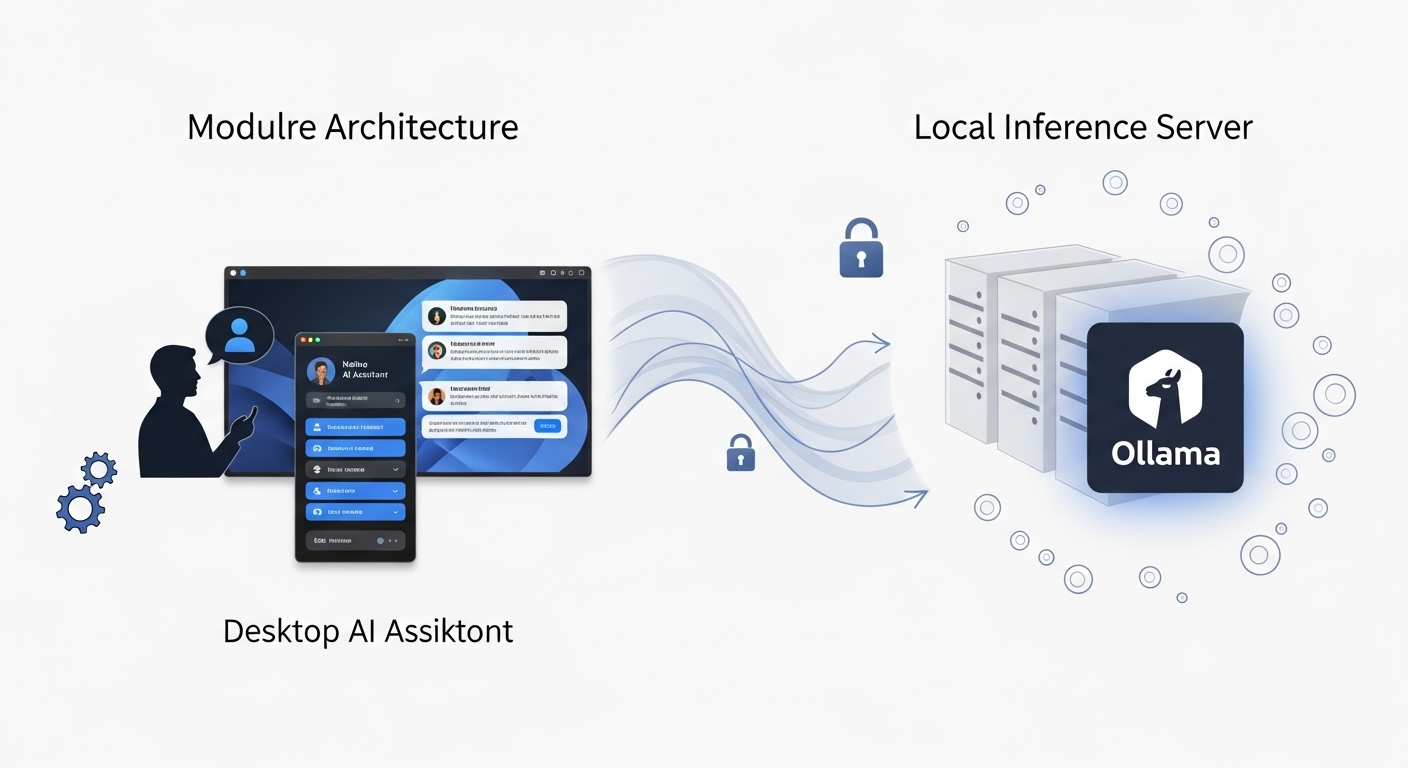
Because most mainstream Linux distributions do not provide an integrated, user-facing AI assistant, a vibrant ecosystem of third-party FOSS applications has emerged to fill this critical gap. This ecosystem has rapidly converged on a standardized, modular architecture: a “client-server” model adapted for the local desktop. This consists of a native desktop assistant (the frontend) that communicates with a local, self-hosted inference server (the backend).
The Rise of the Native Desktop Assistant
GNOME: The Newelle & GnomeLama Ecosystem
The GNOME desktop, which serves as the default for Ubuntu and Fedora, has become the primary battleground for third-party AI assistant development.
The flagship application in this space is Newelle. Having reached its 1.0 release, Newelle is a mature, native GTK4/libadwaita application that positions itself as a “virtual AI assistant”. Its feature set is comprehensive, directly addressing the capabilities users expect from a modern AI assistant:
- Modality: Supports text and voice chat (via STT/TTS models).
- Context: Features long-term memory and the ability to “chat with documents”.
- Integration: Can perform web searches and, most significantly, can execute terminal commands from natural language prompts.
- Extensibility: Supports extensions for adding functionality, such as image generation.
Architecturally, Newelle is a pure frontend. It is designed to connect to multiple backends, giving the user full control.
It supports cloud-based APIs (Google Gemini, OpenAI, Groq) and, most importantly for the FOSS community, integrates seamlessly with local Ollama instances.
Newelle is licensed under the GPL-3.0 and is easily installed as a Flatpak from Flathub. This sandboxed installation, however, necessitates a manual step for its most powerful feature: to allow Newelle to execute terminal commands, the user must use a tool like Flatseal to grant it the necessary permissions.
A notable alternative is GnomeLama, which takes a different approach. Instead of a standalone application, it is a GNOME Shell extension that integrates LLM features directly into the desktop shell, also offering features like file editing and reading of various document formats (PDF,.docx,.odt).
3.1.2 KDE Plasma: A Fragmented but Evolving Landscape
The KDE community is also actively pursuing AI integration, driven by a strong, user-expressed desire for local-first, privacy-respecting tools.
KDE’s history with AI was closely tied to the Mycroft AI project, an open-source, privacy-first voice assistant. The KDE team was actively developing a Plasma integration, including a widget for Mycroft output and a Plasma plugin for desktop interaction. When the Mycroft project folded, it left a vacuum. Successor projects, such as OpenVoiceOS (OVOS), have emerged from the diaspora to continue this work.
The current KDE Plasma 6 strategy is more fragmented and modular. Rather than a single, monolithic assistant, the community is building:
- Plasma Widgets: A collection of open-source widgets for the Plasma 6 desktop that act as simple frontends to various AI services, including ChatGPT, Google Gemini, and, notably, Ollama.
- App-Specific Plugins: There is a strong focus on integrating AI directly into applications, such as the powerful Krita AI Diffusion plugin for generative art in the Krita paint program and experimental Ollama-powered plugins for the Kate text editor.
This approach aligns with the community’s consensus, which heavily favors modular, user-controlled, and self-hosted AI solutions.
3.2 The Self-Hosted Backbone: Local LLM Servers
The desktop assistants described above are primarily “dumb” frontends. The “brain” of the FOSS AI desktop is the local inference server. Driven by a deep-seated desire for privacy, data control, cost-savings, and offline capability, the community has rapidly standardized on a handful of tools that run LLMs locally on user hardware.
3.2.1 The “Client-Server” Desktop Model
This modular “client-server” architecture on the local desktop is the FOSS community’s architectural answer to the monolithic, black-box integrations from Apple and Microsoft. It decouples the User Interface (Newelle, Plasma Widgets) from the inference engine (Ollama). This allows any user to mix-and-match components: they can use the Newelle frontend, but swap the backend from a remote OpenAI API to a local llama3:8b model running on their own GPU, all without changing the frontend application.
3.2.2 Comparative Analysis: Ollama vs. LM Studio vs. Jan.ai
- Ollama: This is the de facto open-source standard. It is a lightweight, command-line-first tool that downloads, manages, and serves open-source LLMs. Its key feature is that it instantly exposes these models via an OpenAI-compatible API. This simplicity and API-first approach have made it the go-to backend for all other FOSS integrations (desktop assistants, editor plugins, automation scripts, etc.).
- Jan.ai: This is a polished, fully open-source desktop application that provides an all-in-one, “ChatGPT alternative” experience. It runs entirely locally, is privacy-focused, and also provides a local API server, making it a direct competitor to Ollama but with a full GUI wrapper.
- LM Studio: This is a powerful and very popular desktop application for running local LLMs, but it is not open-source. It provides a user-friendly GUI and an OpenAI-compatible server. It is relevant to this analysis because it is a major tool used by developers, even those on Linux, in the local-first ecosystem.
3.2.3 The Critical Issue of Licensing (Tools vs. Models)
This ecosystem is a legal and philosophical minefield.
There is a critical distinction between the license of the tool and the license of the model it runs.
- Tool Licensing: Ollama’s core command-line tool is MIT-licensed, but its new, optional desktop application has an unclear, potentially proprietary license, which has created significant friction and confusion within the open-source community. Jan.ai is fully open-source. LM Studio is fully proprietary.
- Model Licensing: The models these tools serve are not all “open source” in the FOSS definition. Meta’s popular Llama models, for instance, are released under a restrictive “Llama Community License” that is not an OSI-approved open-source license. Other models, such as OpenAI’s gpt-oss and openchat, are released under the permissive Apache 2.0 license. This distinction is critical for developers, as the Apache 2.0 license is ideal for experimentation and commercial deployment, carrying no copyleft restrictions or patent risks.
3.2.4 Integration Case Study: Localizing the Deepin AI Assistant
The modular, local-first “client-server” model is so dominant that even the most polished, integrated FOSS solution—the Deepin 25 AI Assistant—is designed to embrace it. While Deepin’s assistant integrates with cloud services, its developers provide an official guide for configuring it to use a local Ollama instance.
The documented process is straightforward:
- Install the Ollama CLI tool: curl -fsSL https://ollama.com/install.sh | sh.
- Run a local model: ollama run qwen2:7b.
- Open the UOS AI settings, select “Custom,” and enter the local OpenAI-compatible endpoint provided by Ollama: http://127.0.0.1:11434/v1.
This integration proves that the modular FOSS architecture is the winning standard. It allows users to combine Deepin’s beautiful, system-integrated frontend with a private, offline, self-hosted backend, achieving the best of both worlds. This same integration pattern is being replicated across the FOSS ecosystem, from smart home platforms like Home Assistant to various custom web UIs.
Section 4: The Foundational Layer: Open-Source Hardware Acceleration
4.1 The Prerequisite for Performance
Modern AI, particularly LLM inference, is computationally expensive. While CPU-only inference is technically possible and supported by some local AI frameworks, real-time performance for a responsive desktop assistant is entirely dependent on specialized hardware accelerators. The single greatest challenge and bottleneck for the FOSS AI desktop is the state of the open-source driver and software stack required to utilize this hardware.
4.2 The GPU: NVIDIA’s Dominance and FOSS Integration
The AI development landscape is dominated by NVIDIA. Its proprietary CUDA platform is the entrenched software standard, making NVIDIA GPUs the default, and often only, choice for serious AI/ML workloads. For decades, this created a deep rift with the Linux community, as NVIDIA’s proprietary “binary blob” drivers were notoriously difficult to install, unstable, and antithetical to the FOSS philosophy.
A landmark development has fundamentally changed this relationship: NVIDIA is now publishing open-source GPU kernel modules. This release, under a dual GPL/MIT license, was a significant step toward improving the Linux user experience. It allows for tighter integration with the operating system, easier debugging, and, most importantly, allows distributions like Ubuntu and SUSE to package, sign, and distribute the NVIDIA driver themselves.
This shift is the primary reason that the NVIDIA experience on Linux has dramatically improved. It is the foundation upon which distributions like Pop!_OS have built their reputation for stability. By managing this (now open) kernel module integration and the system76-cuda user-space packages flawlessly, they provide the reliable experience developers demand. While still not as inherently seamless as the open-source graphics drivers for AMD or Intel, NVIDIA GPU support on Linux is now a largely solved problem.
4.3 The NPU: The New Frontier and FOSS’s Struggle
The future of efficient, always-on, low-power desktop AI is the Neural Processing Unit (NPU). These are specialized, low-power “AI brains” integrated directly into modern SoCs from Intel, AMD, and Apple. They are designed to offload persistent AI tasks (like voice recognition, or Copilot-style background processing) from the power-hungry CPU and GPU. For FOSS, supporting this new class of hardware is the next major challenge, and the results thus far are mixed.
- Intel (AI Boost): Intel has shown active and promising support for its NPU (marketed as “AI Boost”) on Linux. There is an official, open-source linux-npu-driver available on GitHub. The core kernel driver (IVPU) has been upstreamed into the mainline Linux kernel.
The Bottleneck: While the kernel driver exists, the user-space software stack is immature. The primary and, in many cases, only way to programmatically access the Intel NPU on Linux is via Intel’s own OpenVINO toolkit. Mainstream FOSS applications like Ollama and the wider Python ecosystem have not yet integrated OpenVINO as a primary backend, leaving the NPU largely unused by the FOSS AI stack.
- AMD (Ryzen AI): The situation for AMD’s Ryzen AI NPUs is a strategic failure for the FOSS community.
AMD’s official documentation for its Ryzen AI platform explicitly states Windows-only support. This has left Linux developers with capable hardware they cannot use.
- The Bottleneck: A kernel driver (XDNA) does exist, but this is only half the picture. The user-space software stack required to compile and run models on it (e.g., MLIR-AIE, IREE) is exceptionally complex and not integrated into any user-friendly framework. This has led to widespread frustration, with developers asking, “So what use is an NPU (for which we have a driver…) if there’s no api and software to utilize it?”.
This stark contrast between the hardware’s availability and the software’s readiness highlights a critical gap. The seamless, integrated NPU experience that Microsoft is pushing with its Copilot+ PCs has no FOSS equivalent on x86 desktops, not because of a lack of hardware, but because of a lack of a prioritized, open, user-space software stack from AMD and, to a lesser extent, Intel.
Alternative Architectures: ARM, Apple, and SBCs
- ARM Desktops: As the desktop market begins a significant shift toward the Arm architecture, FOSS AI support is paramount. Arm itself is an active participant in the open-source ecosystem, contributing key libraries like Arm NN (for accelerating neural networks) and the newer, high-performance KleidiAI and KleidiCV libraries. These libraries are OS-agnostic (supporting Linux, Android, and bare-metal) and designed to accelerate AI and CV functions directly on Arm CPUs.
- Apple Silicon (Asahi Linux): For users of Apple M1, M2, and M3 hardware, FOSS AI capability is entirely dependent on the Fedora Asahi Remix project. This team is reverse-engineering the Apple Silicon platform. As of this report, support for the Apple Neural Engine (ANE)—Apple’s NPU—is still listed as “WIP” (Work In Progress) or “TBA” (To Be Announced). It is not yet functional for FOSS AI workloads.
- NVIDIA Jetson: This is a mature, ARM-based embedded platform for edge AI and robotics. The Jetson Nano, for example, runs a “full desktop Linux environment” and is supported by the comprehensive NVIDIA JetPack SDK. This SDK is a complete, albeit proprietary, software stack that includes GPU-accelerated versions of TensorFlow and other critical AI tools. It represents a powerful, FOSS-adjacent (Linux-based) solution for AI development.
- Raspberry Pi 5 & Hailo AI: The success of the Raspberry Pi 5 platform in AI serves as a powerful case study and a stark contrast to the x86 NPU landscape. The official Raspberry Pi AI Kit bundles a Hailo-8L NPU via an M.2 HAT.
- The FOSS Success Story: When running the 64-bit Raspberry Pi OS (Bookworm), the operating system automatically detects the Hailo NPU. The entire software stack—kernel driver, firmware, and middleware—is installed with a single command: sudo apt install hailo-all.
- This stack includes the HailoRT (runtime), which Hailo has made open-source. The Raspberry Pi and Hailo teams also provide numerous open-source examples and integrations, including native support in the rpicam-apps stack. This enables a complete, seamless, and open-source development-to-production pipeline.
- The Raspberry Pi/Hailo partnership provides a fully functional, easy-to-use, and open-source NPU hardware/software stack. This proves that such integration is not just possible, but achievable on a massive scale. The failure of AMD and the partial success of Intel on the desktop is therefore demonstrably a failure of strategy and prioritization for the FOSS ecosystem, not a fundamental technical impossibility. The “hobbyist” platform has successfully delivered what the desktop giants have not.
Future Horizons: The “AI-Native” Operating System
The Architectural Shift
The second paradigm, the “AI-Native” OS, moves beyond augmentation to fundamental integration. This section analyzes experimental FOSS and FOSS-adjacent projects that are rebuilding the operating system from the ground up, treating AI agents as first-class citizens. This “AI-First” architecture is a direct response to the limitations of running AI workloads on legacy OS designs. The goal is to create an OS that is conversational, context-aware, proactive, and manages resources intelligently, rather than with static rules.
This approach is not about adding an assistant “app”; it is about re-engineering the foundational pillars of computing. The most advanced projects in this space are targeting the two core, unchanged abstractions of traditional operating systems: the process scheduler and the hierarchical file system.
Industry & Conceptual Frameworks
- The “AI-First” OS Concept: This theoretical model describes an OS built with an AI-native kernel, adaptive memory management, and intelligent scheduling. The primary user interface ceases to be a mouse and keyboard, becoming a natural language conversation that manages tasks and orchestrates applications.
- Red Hat’s “Standard AI OS”: Red Hat and IBM are pushing an enterprise-focused concept of a “standard AI operating system”. This is less about desktop interaction and more about creating a standardized, open-source runtime environment to solve AI scaling, deployment, and management challenges in hybrid-cloud environments.
- Experimental AGI OS: More radical (and currently non-FOSS) projects like KIRA OS claim to be building a true AGI-first system with an “AI brain… at the kernel level”. These projects, along with Google’s research, demonstrate the long-term ambitions of the field.
Academic Research: The LDOS Project
The most significant, open-source academic effort in this space is the Learning Directed Operating System (LDOS). This is a five-year, $12 million research project funded by the U.S. National Science Foundation (NSF).
- Core Goal: The project’s explicit aim is to build an “intelligent, self-adaptive Operating System”. Its revolutionary goal is to replace human-crafted heuristics—the static, “one-size-fits-all” rules that have governed OS resource management and process scheduling for decades—with “advanced machine learning” models. This ML-based kernel would make rich, data-driven decisions to optimize resource allocation, adapting dynamically to new hardware and application demands.
- Open-Source Status: LDOS is a massive collaboration between universities (UT Austin, UIUC, Penn, Wisconsin) and industry partners (Amazon, Google, Microsoft, Bosch, Cisco). The project is committed to creating a “next-generation open-source” operating system. Its public GitHub organization (ldos-project) shows active development on key components like KernMLOps (ML for kernel operations), TraceLLM (trace analysis with LLMs), and a fork of the mainline Linux kernel. The project website maintains a list of publications and available software and data.
Experimental FOSS: The AIOS Project
While LDOS is rebuilding the kernel’s scheduler, the AI Agent Operating System (AIOS) project is rebuilding the OS’s user- and agent-facing abstractions. It is the most advanced public FOSS implementation of an AI-Native OS available today.
- Core Goal: AIOS is an MIT-licensed abstraction layer designed to embed an LLM into the operating system. Its purpose is to solve the unique OS-level problems created by a multi-agent environment, such as agent scheduling, context switching, inter-agent communication, and memory management.
- Core Architecture (Kernel + SDK): The system is composed of two primary, decoupled parts:
- AIOS Kernel: This is the abstraction layer that manages agents, LLM resources, and tools. It provides an “LLM system call interface” for agents.
- Cerebrum (AIOS SDK): This is the Software Development Kit for developers. It provides the tools to build, deploy, discover, and distribute AI agents that run on the AIOS platform.
- The Semantic File System (LSFS): This is the project’s most revolutionary component, representing the second pillar of the AI-Native OS assault on legacy design. The LLM-based Semantic File System (LSFS) is a “prompt-driven file management” system. It replaces the traditional, hierarchical file system paradigm (e.g., cp /dir/file /new/dir) with natural language commands.
- LSFS uses semantic indexing and a vector database to handle high-level, intent-based queries. The official documentation provides examples such as: “search 3 files that are mostly related to Machine Learning” and “rollback the aios.txt to its previous 2 versions”. This is a fundamental paradigm shift in how users and agents interact with data.
Practical FOSS: ArgosOS
While AIOS is a large-scale research framework, ArgosOS (specifically the yashasgc/ArgosOS repository) is a practical, tangible FOSS implementation of the idea behind the Semantic File System. Its stated goal is to be an “open-source system that combines file storage, tagging, and AI-driven search”. It is a direct, code-level answer to the conceptual problem of an OS that “Organizes documents, links, and tools around goals — not folders” and provides “Semantic Search Across All Devices”.
Note: It is critical to distinguish this specific project (yashasgc/ArgosOS) from unrelated FOSS and commercial entities with the same name, such as argosopentech (a machine translation tool) and the “Argos” industrial and financial corporations.
Strategic Recommendations and Concluding Analysis
This analysis has demonstrated that a “free and open source AI desktop OS” is not a single product but a rapidly evolving ecosystem. The current “AI-Augmented” model is practical but fragmented, while the future “AI-Native” model is revolutionary but experimental.
Based on these findings, the following strategic recommendations are provided for different technical user profiles.
Recommendation for the Developer/Prosumer (The Present)
For a developer, data scientist, or “prosumer” power user seeking the most stable, powerful, and productive FOSS AI desktop today, the optimal solution is not a single download but an assembled stack of best-in-breed components.
- Base Operating System: The choice of OS should be driven by hardware stability.
- Primary Choice: Pop!_OS. Its commercially-driven, superior management of NVIDIA proprietary drivers and CUDA packages provides the most frictionless, stable, and “it-just-works” experience for AI development.
- Alternative: Fedora 41+. This is the ideal choice for researchers on the absolute cutting edge, or for those using AMD GPUs who require the latest ROCm 6 support.
- Hardware: An NVIDIA GPU remains the most reliable, best-supported, and pragmatic choice for serious FOSS AI development. NPUs on Linux, while a promising future, are not yet ready for plug-and-play mainstream use due to the immature or non-existent user-space software stacks for Intel and, most notably, AMD.
- Local AI Backend: Ollama. This tool should be installed as the system’s local inference server. It has become the de facto API standard for the entire FOSS ecosystem, ensuring maximum compatibility with any frontend or tool.
- Desktop AI Frontend:
- On GNOME (Fedora, Pop!_OS, Ubuntu): Newelle. As a mature 1.0 release, it is the most feature-complete, native, and well-integrated FOSS assistant, with critical features like terminal execution and document chat.
- On KDE Plasma: The Plasma 6 Widgets that are explicitly compatible with Ollama are the best current option for integrating a local LLM directly onto the desktop.
Recommendation for the Researcher/Vanguard (The Future)
For the advanced researcher, OS developer, or community contributor interested in building the next generation of AI operating systems, efforts should be focused on the foundational, experimental projects.
- Kernel-level AI: The LDOS project is the most significant academic-led effort. Contributing to its research on ML-based kernel heuristics is a high-impact endeavor.
- Agentic OS Framework: The AIOS project is the key FOSS framework for agentic computing. Contributing to its Cerebrum SDK (to build agents) or its LSFS (Semantic File System) (to redefine data interaction) is the most direct way to participate in “AI-Native” OS development.
- Hardware Enablement (The Critical Bottleneck): The most urgent area requiring FOSS community contribution is the hardware stack.
- AMD Ryzen AI: The top priority is building a usable, open-source user-space software stack for AMD’s NPUs, which are currently inert on Linux.
- Apple Neural Engine: The Fedora Asahi project requires skilled developers to help reverse-engineer and write open-source drivers for the ANE.
Final Assessment: The Converging Paradigms
The current division between the “AI-Augmented” desktop of today and the “AI-Native” OS of tomorrow is a temporary, transitional phase. These two paradigms are not parallel paths but are on a collision course.
As NPUs become ubiquitous in all desktop and laptop hardware, and as the FOSS driver and software stacks for them (e.g., Intel’s linux-npu-driver) inevitably mature, the revolutionary concepts currently confined to research labs will be pulled upstream.
It is highly likely that features like the AIOS Semantic File System and the LDOS adaptive schedulers will eventually be merged, in some form, into the mainline Linux kernel and become standard, abstracted components of future mainstream distributions. The community-built frontends like Newelle and the standardized backends like Ollama are serving as the critical bridge, popularizing the “client-server” desktop model that will allow users to seamlessly plug these new, native-AI kernel features into their existing workflows.
The evolution is clear: the FOSS desktop is moving from an operating system that runs AI applications to an operating system that is an AI.