Top AI Coding Tools 2025: Agentic IDEs Compared
The Age of the Agentic Interface: A Comparative Analysis of AI-Driven Development Environments in Late 2025
Executive Summary: The Industrial Revolution of Code
The software development landscape in late 2025 has undergone a metamorphosis so profound that the terminology of the previous decade—“text editor,” “autocomplete,” “syntax highlighting”—no longer adequately describes the tools of the trade. We have transitioned from the era of Synchronous Augmentation, where AI models like the early GitHub Copilot predicted the next few tokens of code based on immediate proximity, to the era of Asynchronous Agency, where “Agentic IDEs” function as autonomous colleagues capable of reasoning, planning, executing, and verifying complex engineering tasks.

This report provides an exhaustive, expert-level analysis of the five dominant platforms that define this new paradigm: Cursor, Windsurf (by Codeium), Google Antigravity, GitHub Copilot (Agent Mode), and Claude Code. Furthermore, it examines the resurgence of OpenAI Codex as a distinct, high-performance offering and evaluates the ecosystem of open-source challengers like Cline and Aider.
Our analysis, grounded in technical benchmarks, architectural deconstruction, and enterprise adoption metrics, reveals a market that has bifurcated into two distinct philosophical approaches. The first, exemplified by Cursor and Windsurf, prioritizes the “Flow State,” utilizing deep context and speculative decoding to keep the human developer in a tight, high-velocity loop of creation. The second, championed by Google Antigravity and Claude Code, introduces the “Mission Control” paradigm, where the developer acts as an architect or manager, dispatching autonomous agents to perform long-running tasks—refactoring, testing, and debugging—in the background.
The implications of this shift are far-reaching. The unit of work is no longer the “line of code” but the “feature specification.” The primary bottleneck in software production is shifting from typing speed and syntax recall to context management and verification. As these tools achieve benchmark scores exceeding 70% on the SWE-bench Verified dataset, they are effectively displacing the traditional responsibilities of junior engineers, forcing a recalibration of hiring practices, career development pipelines, and the economic structure of software engineering itself.
The Theoretical Framework: From Copilots to Agents
To understand the comparative advantages of the tools in 2025, one must first deconstruct the technological evolution that separates them from their 2023 ancestors. The leap from “Copilot” to “Agent” is not merely marketing nomenclature; it represents a fundamental change in system architecture, memory management, and interaction design.
The Collapse of the Stateless Paradigm
The Copilot Era (2021–2024) was defined by the limitations of In-Fill Modeling (FIM). These early systems treated code generation as a localized text prediction problem. They were statistically impressive but architecturally myopic; they could predict the next line of a function but lacked awareness of the database schema defined in a separate repository or the business logic implied by a legacy module. They were stateless, forgetting the user’s preferences and the project’s constraints the moment the editor window closed.
The Agentic Era (2025–Present) is predicated on Cognitive Persistence and Stateful Reasoning. The modern AI IDE does not just “read” the open file; it indexes the entire codebase, constructing a semantic graph of dependencies, variable flows, and historical changes.
- Vector Embeddings vs. Knowledge Graphs: While early attempts relied on Retrieval-Augmented Generation (RAG) using simple vector similarity, 2025’s leaders like Windsurf and Antigravity utilize hybrid systems. They combine vector search with symbolic analysis (AST parsing) to understand that a change in User.ts necessitates a change in AuthController.java, even if the files share no lexical similarity.
- Episodic Memory: Tools like Windsurf have introduced “Memories”, a mechanism where the agent explicitly records user preferences, architectural decisions, and project-specific rules into a persistent database. This allows the tool to “learn” the developer’s style over time, eliminating the repetitive prompting that plagued earlier LLMs.
The Anatomy of an Agentic Loop
The defining characteristic of the tools analyzed in this report—particularly Antigravity and Claude Code—is the OODA Loop (Observe, Orient, Decide, Act). Unlike a chatbot that outputs text and waits, an agentic IDE possesses:
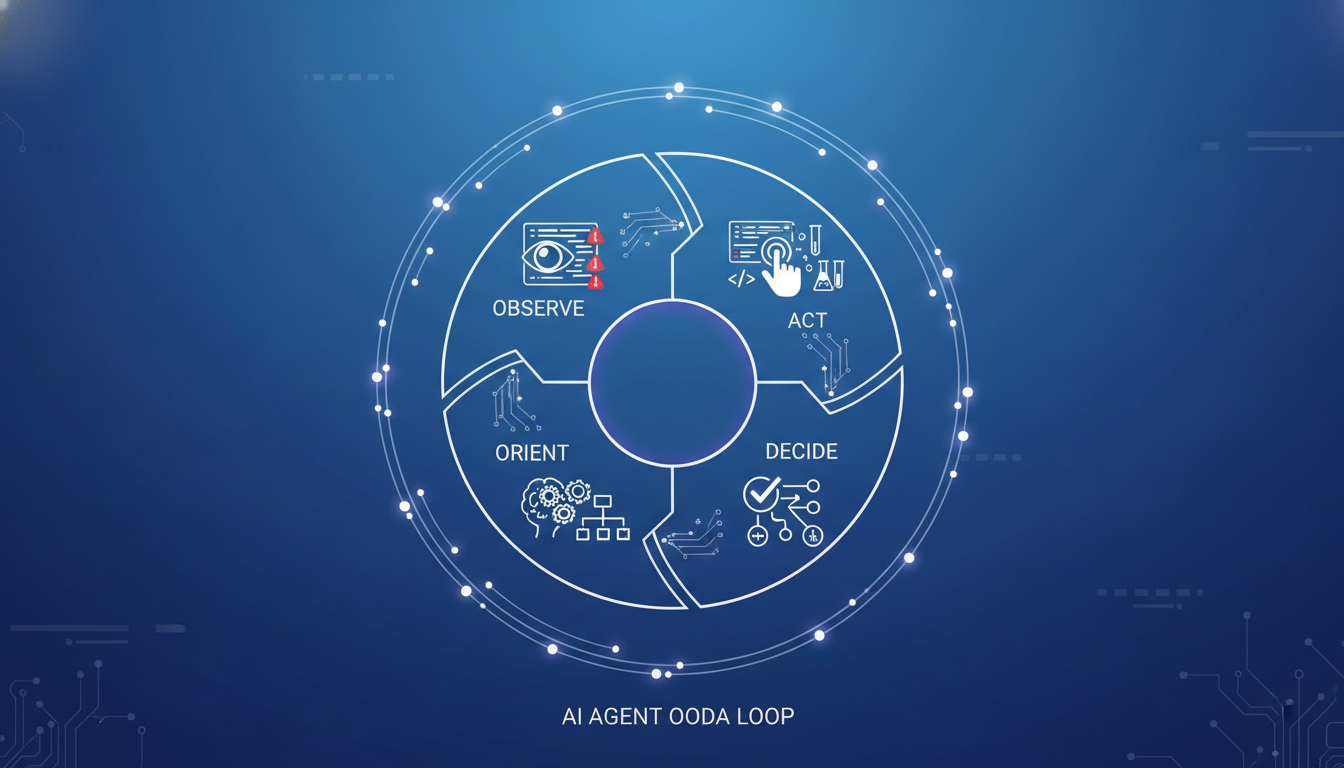
- Tool Use Authority: The ability to execute terminal commands, run compilers, and manipulate the file system directly.
- Self-Correction (Reflection): The capacity to read error logs or test failures, diagnose the root cause, modify the code, and retry the operation without human intervention.
- Chain-of-Thought (CoT) Reasoning: Leveraging “Thinking Models” like GPT-5.2 and Claude 3.7 Sonnet, these agents engage in extended deliberation—spending computation time (inference tokens) to plan a refactor before touching the file system.
The Emergence of “Vibe Coding”
This technological maturity has given rise to a new development methodology termed “Vibe Coding”. In this paradigm, the human engineer operates almost exclusively at the level of intent and verification. The developer describes the “vibe” (e.g., “Create a dark-mode dashboard with real-time websocket updates for stock prices”), and the AI handles the implementation details.
Success in Vibe Coding is measured by two metrics: Trust and Latency.
- Trust: Can I accept the AI’s output without reading every line? (Driven by verification artifacts and past accuracy).
- Latency: Does the tool respond fast enough to maintain my mental model? (Driven by model size and speculative decoding).
The market has responded to these needs by splitting into tools that maximize Latency (Cursor, Windsurf) for synchronous flow, and tools that maximize Autonomy (Antigravity, Claude Code) for asynchronous heavy lifting.
The Titans of Synchronous Flow: Cursor and Windsurf
The most fiercely contested segment of the market is the “Editor Replacement” category. Both Cursor and Windsurf aim to be the primary interface where developers spend their day. While they share a foundation (both heavily modified forks of VS Code), their philosophies on how to integrate AI diverge significantly.
Cursor: The High-Velocity Scalpel
Cursor has established itself as the tool of choice for the “power user”—the developer who wants to move at the speed of thought. Its rapid ascent, culminating in a $9 billion valuation, is driven by a singular focus on reducing the friction between intent and keystrokes.
The “Composer” Workflow: Multi-File Orchestration
Cursor’s flagship innovation, Composer, broke the “sidebar paradigm.” Instead of chatting with an AI in a separate window, Composer allows users to open a modal interface (CMD+I or CMD+K) that floats over the code.
- Mechanism: When a user requests a change (e.g., “Refactor the API response to include metadata”), Composer identifies the relevant files via a RAG-based search. It then applies edits across multiple files simultaneously—updating the interface definition, the backend handler, and the frontend component in one pass.
- User Experience: The experience is akin to conducting an orchestra. The user sees the code morphing in real-time across split panes. However, Cursor defaults to a “human-in-the-loop” philosophy. It presents these changes as diffs that the user must review and accept (Tab through). This design choice prioritizes control over pure automation.
Speculative Decoding and the “Tab” Experience
Cursor’s “Tab” feature is widely regarded as the industry standard for autocomplete latency. It utilizes a technique known as Speculative Decoding.
- The Technical Edge: Instead of waiting for a massive model (like GPT-4 or Claude 3.5) to generate the next token, Cursor uses a smaller, hyper-fast “draft model” to guess the next few lines. The large model then verifies these guesses in parallel.
- The Result: The autocomplete feels instantaneous, often predicting entire blocks of logic (10-20 lines) before the user has finished typing the function name. This creates a psychological state of “flow” where the user feels they are directing a stream of code rather than typing character-by-character.
Context Management: The “Manual RAG” Approach
Cursor’s approach to context is powerful but manual. It relies on explicit user tagging.
- @Symbols: Users direct the AI’s attention using symbols like @Codebase (search everything), @Files (specific files), @Web (search the internet), or @Docs (indexed documentation).
- Pros & Cons: This gives the user precise control—you know exactly what the AI is looking at. However, it places the cognitive load on the user. If the developer forgets to tag a relevant utility file, Cursor’s RAG search may miss it, leading to hallucinations or duplicated code. This “Context Amnesia” in long sessions is a frequently cited weakness.
The Shadow Workspace
A critical but often invisible feature is Cursor’s Shadow Workspace. The IDE spins up a hidden instance of the project environment to run linters and compilers on the AI’s generated code before it is shown to the user. If the AI generates code that causes a syntax error, the Shadow Workspace catches it, and the model self-corrects invisibly. This “Speculative Linting” significantly increases the “first-try acceptance rate” of code suggestions.
Windsurf: The Context-Aware Flow Engine
Windsurf, developed by Codeium, represents the first “Agent-Native” IDE.
2.2. Windsurf: The Deep Context Agent
2.2.1. Cascade and “Deep Context”
Windsurf’s primary competitive advantage is its Deep Context Engine. Unlike Cursor’s manual tagging, Cascade utilizes a sophisticated indexing system that builds a Temporal Knowledge Graph of the codebase.
- Implicit Awareness: Cascade tracks the user’s “gaze”—which files are open, which functions are hovered over, and the sequence of recent terminal commands. It combines this with a static analysis of the code structure.
- The “Jump-to-Definition” Effect: Because it understands the code graph, Cascade knows that changing a function signature in a backend service impacts a specific frontend component, even if the files share no text similarity. This allows for “zero-shot” prompting where the user simply says “Fix the bug,” and Windsurf finds the relevant files automatically.
2.2.2. “Memories”: The Learning IDE
Windsurf introduces a feature called Memories, which fundamentally changes the long-term relationship between developer and tool.
- Mechanism: When a user corrects the AI (e.g., “We use zod for validation, not joi”), Cascade creates a persistent memory object: [Preference] Enforce Zod for validation.
- Persistence: These memories are stored locally and retrieved in all future sessions. Over weeks of usage, Windsurf “learns” the team’s architectural patterns and the user’s stylistic quirks. This contrasts with Cursor, where rules must be manually encoded in a .cursorrules file (though Cursor is adding similar features, Windsurf’s dynamic approach is currently superior).
2.2.3. “Flows” and Hybrid Intelligence
Windsurf utilizes a proprietary tiered model architecture involving the SWE-1 family of models (mini, lite, full) alongside frontier models like GPT-5 and Claude.
- Cascade Flows: These are agentic routines that allow Cascade to take multi-step actions. A “Flow” might involve: 1. Analyzing a stack trace in the terminal. 2. Searching the code for the error source. 3. Running a test to reproduce it. 4. Applying a fix. 5. Verifying the fix.
- Performance: Windsurf offloads simple tasks (autocomplete) to the ultra-low-latency SWE-1 models running on proprietary infrastructure, reserving the expensive frontier models for complex reasoning. This hybrid approach balances speed and intelligence, often feeling “snappier” for routine tasks than pure API wrappers.
2.2.4. Enterprise Philosophy: Zero Retention
Windsurf targets the enterprise market aggressively with a “Zero Data Retention” policy by default on its commercial plans. Its architecture allows for a “Hybrid” deployment where the model inference happens in the cloud, but the codebase index and “Memories” remain local or within the customer’s VPC. This architectural separation appeals to security-conscious CIOs who are wary of “training on customer data”.
2.3. Head-to-Head: Cursor vs. Windsurf
The choice between Cursor and Windsurf largely depends on the developer’s preferred workflow: Control vs. Context.
| Feature Category | Cursor | Windsurf | Analysis |
|---|---|---|---|
| Context Strategy | Manual RAG (@Codebase) | Deep Graph (Implicit) | Cursor offers precision; you know exactly what the AI sees. Windsurf offers “magic”; it usually guesses right, reducing cognitive load. |
| Latency (Typing) | Winner (<50ms) | Very Fast (~200ms) | Cursor’s speculative decoding is still the gold standard for “feeling” instant. |
| Agentic Autonomy | Moderate (Composer) | High (Cascade Flows) | Windsurf’s Cascade is more willing to take multi-step actions without prompting, whereas Cursor prefers user confirmation for each step. |
| Personalization | Static (.cursorrules) | Dynamic (Memories) | Windsurf’s ability to self-update its knowledge base gives it a long-term advantage in “learning” a codebase. |
| Migration | Seamless (VS Code fork) | High Friction (New Binary) | Cursor allows users to import extensions instantly. Windsurf requires a separate installation, though it supports VS Code extensions. |
3. The Asynchronous Orchestrators: Google Antigravity and Claude Code
While Cursor and Windsurf fight for the “Editor” space, a new category of tool has emerged: the Orchestrator. These tools are not designed for typing code but for managing the generation of code. They acknowledge that as AI becomes more capable, the human role shifts from “writer” to “reviewer.”
3.1. Google Antigravity: Mission Control for Code
Google Antigravity, released in late 2025, represents the most radical departure from traditional IDE design. Built on the massive context window of Gemini 3 Pro (2 million+ tokens), Antigravity treats the developer as a “Mission Controller”.
3.1.1. The “Agent-First” Interface
Antigravity bifurcates the IDE into two distinct surfaces:
- The Editor: A familiar, VS Code-based environment for manual coding.
- The Agent Manager: A Kanban-style dashboard where users spawn and monitor independent agents.
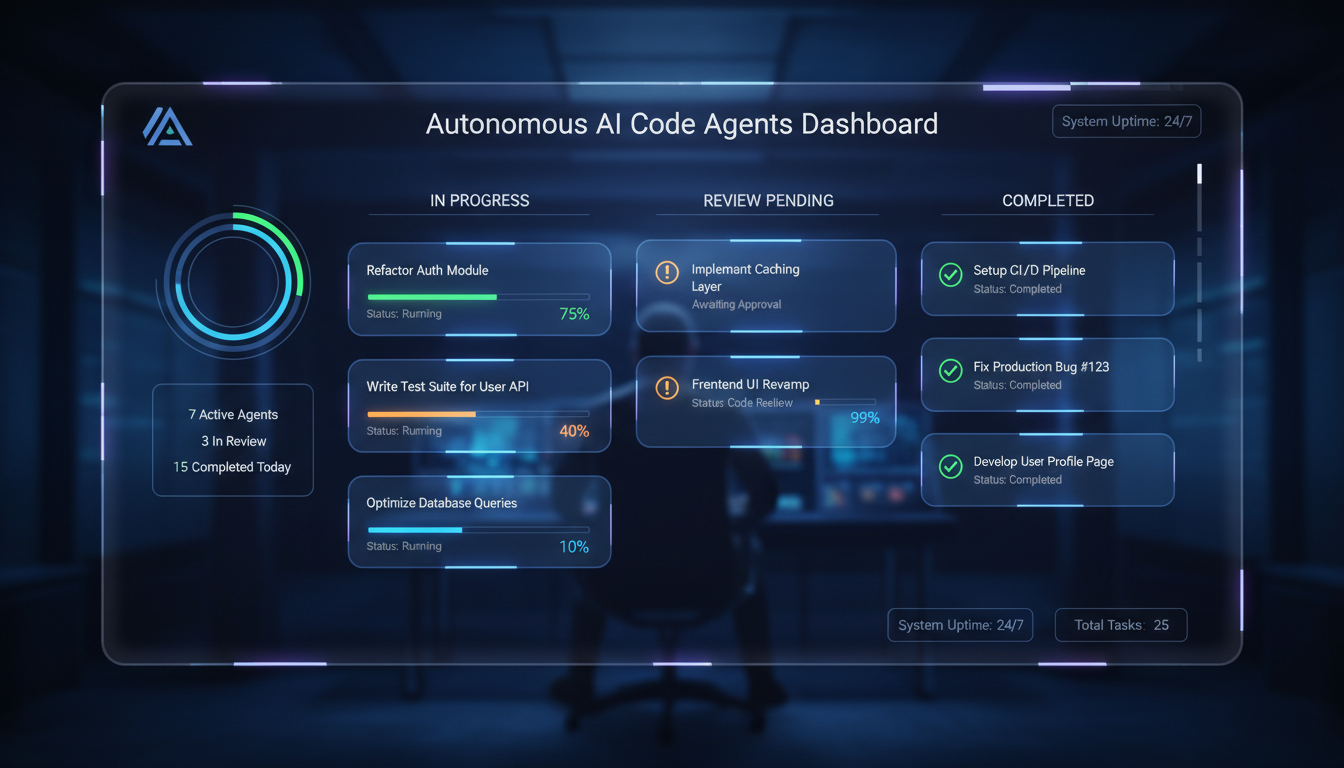
This separation allows for Parallel Asynchrony. A single developer can dispatch three separate agents simultaneously:
- Agent A: “Refactor the authentication module to use OAuth 2.0.”
- Agent B: “Write a comprehensive test suite for the payment gateway.”
- Agent C: “Scrape the Stripe documentation and update our API wrappers.”
The developer does not watch these agents type. They wait for a notification that the task is complete, then review the output.
3.1.2. Trust through Artifacts
Because the user is removed from the immediate generation loop, Trust becomes the primary bottleneck. Antigravity solves this with Artifacts.
- Implementation Plans: Before writing a single line of code, the agent generates a Markdown document outlining its strategy. The user reviews and edits this plan (e.g., “Don’t use axios, use fetch”).
- Visual Verification: Antigravity includes a fully autonomous Headless Browser. For frontend tasks, the agent spins up the app, clicks through the UI, and captures screenshots or video recordings of the result. Seeing a video of the agent successfully logging in builds far more trust than a green checkmark on a unit test.
3.1.3. The Gemini Bottleneck: Rate Limits & Latency
Antigravity’s power comes at a steep price: Compute. The “Agent Loops”—where Gemini 3 Pro reflects, plans, acts, and verifies—consume massive amounts of tokens.
- The “5-Hour” Wall: Even “Ultra” subscribers report hitting hard rate limits after just a few hours of heavy agent usage. The system’s reliance on the massive 2M context window means every prompt is expensive. This scarcity of inference is currently the single biggest complaint and limitation of the platform.
- Latency: Antigravity is not for “Vibe Coding.” It is for “Coffee Break Coding.” A complex task might take 5-15 minutes to complete. It requires a different mindset—patience and planning—that conflicts with the instant-gratification culture of modern development.
3.2. Claude Code: The Terminal Commander
Claude Code is Anthropic’s answer to the agentic question. Eschewing the GUI entirely, it brings the power of Claude 3.7 Sonnet directly to the Command Line Interface.
3.2.1. The Unix Philosophy of AI
Claude Code targets the senior engineer, the DevOps specialist, and the “terminal junkie.” It operates on the principle that text streams are the universal interface.
- Mechanism: Users type natural language commands into their terminal: claude “Investigate the high latency in the /search endpoint. Check the nginx logs and the redis latency.”
- Agentic Execution: Claude Code then acts as an autonomous agent. It runs ls, grep, cat, and even executes database queries. It reads the output, reasons about it, and iterates. It is effectively a “Junior Dev in a Box” that lives in your shell.
3.2.2. Extended Thinking with Sonnet 3.7
Claude Code is the primary vehicle for Claude 3.7 Sonnet’s “Extended Thinking” capability.
- The “Thinking Block”: When faced with a complex architectural problem, Claude Code engages a deliberation phase. It might spend 30-60 seconds “thinking” (generating hidden chain-of-thought tokens) before taking action. Benchmarks show that this deliberation significantly reduces “hallucinated fixes” and increases the success rate on complex debugging tasks.
3.2.3. The Cost of Agency
Because Claude Code is often used via API (or high-tier subscriptions), the cost can be significant. An agent that gets stuck in a “Try -> Fail -> Retry” loop can burn through substantial credits in minutes. While Anthropic provides tools like the /cost command to monitor usage, the “bill shock” remains a friction point compared to flat-rate SaaS tools.
4. The Incumbents and the Engine: GitHub Copilot and OpenAI Codex
4.1. GitHub Copilot: The Ecosystem Moat
GitHub Copilot enters late 2025 in a defensive but fortified position. While it has ceded the “innovation leader” title to Cursor and Windsurf, it retains the “market leader” title through sheer distribution and integration.
4.1.1. Agent Mode and “Laziness”
Copilot’s answer to Cursor is Copilot Agent Mode (integrated into VS Code). While capable of multi-file edits and terminal commands, user feedback consistently describes it as “conservative” or “lazy” compared to competitors. It often prefers to leave //… rest of code comments rather than completing the full refactor, a behavior likely tuned to reduce inference costs and liability for Microsoft.
4.1.2. The “Graph” Advantage
Copilot’s true strength is its integration with the GitHub Graph.
It is the only tool that effectively bridges the IDE and the platform.
- PR Awareness: Copilot can read the Pull Request description, link linked Issues, and suggest code that aligns with the broader project roadmap.
- Security: Integration with GitHub Advanced Security means Copilot can proactively fix vulnerabilities (CVEs) before the code is even committed, leveraging a database of security patterns that standalone IDEs lack.
OpenAI Codex (GPT-5.2): The Resurgent Engine
After a period of quiet, OpenAI re-entered the tooling space in late 2025 with GPT-5.2-Codex, a specialized model and extension.
Benchmark Supremacy
As of December 2025, GPT-5.2-Codex sits atop the SWE-bench Verified leaderboard with a score of 71.80%, narrowly edging out Claude 4.5 Sonnet.
- Specialization: Unlike generic models, Codex is fine-tuned specifically for agentic behaviors—navigating file trees, interpreting diffs, and managing terminal states.
Windows Optimization
Recognizing a gap in the Unix-centric market (where Claude Code and standard terminal tools dominate), OpenAI optimized Codex for PowerShell and Windows environments. This strategic move makes it the premier choice for.NET developers and enterprise environments locked into the Microsoft ecosystem, offering performance on Windows that Unix-first tools often struggle to match.
The Open Source and Niche Challengers
While the giants battle, an ecosystem of open-source and niche tools has flourished, driven by the desire for privacy, model neutrality, and lower costs.
Cline (formerly Claude Dev)
Cline is a VS Code extension that brings agentic capabilities to the editor without the “platform lock-in” of Cursor or Windsurf.
- Model Agnosticism: Cline allows users to plug in any API key—Anthropic, OpenAI, Gemini, or even local models via Ollama.
- The “Human-in-the-Loop” Focus: Cline is designed to be transparent. It shows every tool use and requires approval (unless configured otherwise). It is the tool of choice for privacy advocates who want to run DeepSeek-R1 or Llama 4 locally on their own hardware.
Aider
Aider is the spiritual predecessor to Claude Code—a CLI-first pair programmer.
- Git Integration: Aider’s superpower is its deep Git integration. It automatically commits changes with descriptive messages, creating a granular history of the AI’s work.
- Benchmark Performance: Despite being an open-source tool, Aider consistently ranks high on benchmarks because of its sophisticated “repository map” algorithm, which efficiently packs context into the prompt.
Benchmarks and Performance Analysis
In the Agentic Era, we measure performance not by “tokens per second” but by “issues resolved per hour.”
SWE-bench Verified (Late 2025 Snapshot)
The SWE-bench Verified dataset remains the gold standard for evaluating an agent’s ability to solve real-world GitHub issues autonomously.
| Rank | Model / Tool System | % Resolved | Cost per Run (Avg) | Analysis |
|---|---|---|---|---|
| 1 | GPT-5.2-Codex (High Reasoning) | 71.80% | $0.52 | The current logic king. Best for algorithmic complexity. |
| 2 | Claude 4.5 Sonnet | 70.60% | $0.56 | Nearly indistinguishable from GPT-5.2. Wins on code readability. |
| 3 | Claude 3.7 Sonnet | ~67.0% | $0.27 | The Efficiency Champion. Delivers 95% of the performance at 50% of the cost. |
| 4 | Gemini 3 Pro (Preview) | 74.20%* | $0.46 | Score unverified by third parties. High potential but erratic in real-world instruction following. |
Insight: The “Intelligence Gap” has closed. The top models are all within the margin of error for practical utility. The differentiator is now Cost and Speed. Claude 3.7 Sonnet represents the “sweet spot” for mass deployment—capable enough for most tasks but cheap enough to run in loops.
Latency and “Time-to-Code”
While SWE-bench measures autonomy, developer satisfaction is driven by latency.
- Autocomplete Latency:
- Cursor (Tab): < 50ms (Perceived).
- Windsurf (SWE-1): ~150ms.
- GitHub Copilot: ~200-300ms.
- Agentic Response Time:
- Windsurf (Cascade): 3-10 seconds. (Context graph lookup + inference).
- Antigravity (Agent): 2-15 minutes. (Full planning + execution loop).
The Psychological Threshold: Developers generally accept a ~200ms delay for autocomplete. For agentic tasks, the tolerance is ~10 seconds. Anything longer than 10 seconds breaks the “flow” and forces a context switch (checking email/Slack). This categorizes Antigravity and Claude Code as “Delegate and Wait” tools, while Cursor and Windsurf remain “Interactive” tools.
The Enterprise Reality: Pricing, Security, and Governance
The Pricing Shift: From Seats to Consumption
The industry is moving away from the simple “$20/user/month” model. Agentic loops are compute-intensive.
- Windsurf & Cursor: Use a “Pro” model ($15-$20/mo) with “Fast Request” quotas (e.g., 500 fast requests/mo). Heavy users are throttled or pushed to buy add-on packs.
- Claude Code / Antigravity: Often expose the raw cost of tokens (via API or cloud billing). This leads to unpredictable billing.
- Prediction: 2026 will likely see a “Base + Overage” model become standard in the enterprise, similar to cloud compute billing.
Security and Data Residency
- Windsurf leads with a Zero-Data Retention default. Its architecture ensures that code snippets sent to the cloud for inference are discarded immediately, satisfying strict SOC 2 and GDPR requirements.
- GitHub Copilot relies on Indemnification. Microsoft guarantees that if Copilot generates code that infringes IP, they will legally protect the customer. This legal shield is a massive selling point for risk-averse enterprises.
- Cursor offers a Privacy Mode (zero retention) but lacks the “Hybrid” deployment options of Windsurf, making it harder to sell to defense/finance sectors that require air-gapped or VPC-contained indices.
Conclusion: The New Division of Labor
The comparison of “Cursor vs. Copilot vs. Antigravity” is no longer a comparison of editors; it is a comparison of workflows.
- Cursor is the tool for the Solo Artisan. It amplifies the individual’s speed, assuming the user knows what to build and wants to build it now. It is the “Sports Car” of IDEs.
- Windsurf is the tool for the Team Player. Its “Memories” and deep context engine ensure consistency across a team, preventing the AI from making the same mistake twice. It is the “High-Speed Train”—fast, consistent, and aware of the network.
- Antigravity and Claude Code are tools for the Architect/Manager. They are designed for tasks where the developer’s time is too valuable to be spent typing. They represent the industrialization of code generation—the “Construction Crew” that you direct from the safety of the trailer.
The Final Verdict for Late 2025:
- If you want to code faster: Choose Cursor.
- If you want to code smarter in a large team: Choose Windsurf.
- If you want to stop coding and start managing agents: Choose Google Antigravity or Claude Code.
The “best” IDE is no longer about the features it has, but about the role you wish to play in the creation of software. As we move into 2026, the successful developer will be the one who knows when to pick up the scalpel (Cursor) and when to call in the construction crew (Antigravity).